# Welcome
#### 🌟 Welcome to the World of Paal! 🌟
Greetings and a heartfelt welcome to our ever-growing community! At Paal, we’re driven by a simple yet profound philosophy: unlocking the limitless potential of AI and blockchain technology to empower individuals and businesses alike.
***
#### **A Vision for the Future**
Paal isn’t just a platform; it’s a dynamic ecosystem where cutting-edge AI meets the transformative power of decentralization. Our mission is to provide tools, resources, and innovations that simplify the complex, spark creativity, and foster collaboration in an ever-evolving digital world.
***
#### **Empowering Possibilities**
* **Agents and Bots**: Explore intelligent tools that simplify workflows, provide insights, and interact seamlessly across platforms.
* **Automation at Scale**: Harness the power of AI to automate tasks, make smarter decisions, and amplify efficiency.
* **Trust through Transparency**: From audits to secure transactions, we prioritize openness and fairness in every layer of our ecosystem.
***
#### **Why Paal?**
1. **Community at the Core**:
* At Paal, you're more than a user; you’re a contributor to a thriving network where innovation meets collaboration.
2. **Driven by Innovation**:
* We are constantly redefining what’s possible, integrating the latest advancements in AI and blockchain.
3. **A Platform for All**:
* Whether you're here to trade, create, learn, or build, Paal offers a welcoming environment to explore your potential.
***
#### **The Journey Forward**
Together, we are building more than a platform—we're shaping a future where AI and decentralization empower individuals, redefine industries, and foster opportunities for all.
So, whether you're here to innovate, collaborate, or grow, we're excited to have you with us. Welcome to the Paal ecosystem—a world of endless possibilities. Let’s create the future, together. 🚀✨
# Vision, Mission & Focus
At PAAL, our vision is to revolutionize the way people access and navigate the world of cryptocurrencies and blockchain technology through the power of artificial intelligence (AI). Our mission is to empower users to make informed decisions and excel in the rapidly evolving crypto landscape by providing them with an AI-powered platform tailored for their needs. Our focus is on delivering a cutting-edge platform that offers comprehensive knowledge, customization, and scalability in the crypto industry, making this technology accessible to everyone through our innovative tokenomics system.
We are guided by our core values of integrity, diligence, and accountability, and are committed to delivering high-quality, innovative solutions that meet the needs of our customers. Through our vision, mission, and focus, we aim to create a better future for users everywhere, where AI-powered platforms are accessible, user-friendly, and capable of providing accurate and reliable information, support, and tools in the ever-changing world of cryptocurrencies and blockchain technology.
# Vision
At PAAL, our vision is to revolutionize the way people access and navigate the world of cryptocurrencies and blockchain technology. We believe that by leveraging the power of artificial intelligence (AI), we can empower users to make informed decisions, excel in the rapidly evolving crypto landscape, and harness the full potential of digital assets and blockchain innovations.
Our goal is to create an AI-powered platform that is accessible, user-friendly, and capable of providing comprehensive knowledge, support, and tools in the ever-changing world of cryptocurrencies and blockchain technology. We want to provide users with their own personal AI assistant that they can rely on for accurate and reliable information, assistance with customization and scalability, and a deeper understanding of the crypto ecosystem.
We believe that AI has the potential to transform the way we interact with cryptocurrencies and blockchain technology, and we are committed to making this a reality through PAAL. Our vision is to be at the forefront of the AI revolution in the crypto industry, creating innovative and accessible solutions that help users navigate and excel in this exciting and dynamic space.
# Mission
At PAAL, our mission is to empower users to make informed decisions and excel in the rapidly evolving crypto landscape by providing them with an AI-powered platform tailored for their needs. We are dedicated to creating an accessible platform that leverages the latest advancements in artificial intelligence (AI) to offer comprehensive knowledge, support, and tools in the world of cryptocurrencies and blockchain technology.
Our mission is to provide users with the tools they need to navigate the complex and dynamic crypto ecosystem, capitalize on opportunities, and stay ahead of the curve. We believe that by harnessing the power of AI, we can make a positive impact on users' experiences and help them thrive in the world of digital assets and blockchain innovations.
We are committed to delivering high-quality, user-friendly, and innovative solutions that are accessible to everyone. Our goal is to make the benefits of AI available to users everywhere, regardless of their background or experience in the crypto industry.
In short, our mission is to create an AI-powered future where users have the tools they need to navigate, understand, and excel in the world of cryptocurrencies and blockchain technology, unlocking the full potential of these innovative and transformative systems.
# Focus
At PAAL, our focus is on delivering a cutting-edge AI-powered platform that offers comprehensive knowledge, support, and tools in the world of cryptocurrencies and blockchain technology. We believe that by leveraging the latest advancements in artificial intelligence (AI), we can empower users to make informed decisions and excel in the rapidly evolving crypto landscape.
One of our key focuses is our tokenomics system, which offers exclusive access to premium features and services to users who hold a certain number of tokens. This innovative system allows users to benefit from the full range of PAAL's services, providing them with a convenient and cost-effective way to navigate the complex and dynamic crypto ecosystem.
Our focus on tokenomics is part of our commitment to making AI-powered platforms accessible to everyone in the crypto industry. We believe that by offering exclusive access to premium features and services through our tokenomics system, we can help more people harness the power of AI and thrive in the world of digital assets and blockchain innovations.
In conclusion, our focus at PAAL is to deliver a cutting-edge AI-powered platform that provides comprehensive knowledge, support, and tools in the world of cryptocurrencies and blockchain technology, and to make this technology accessible to everyone through our innovative tokenomics system.
# Values
## Our Values
At PAAL, we are guided by three core values: integrity, diligence, and accountability. These values shape the way we conduct ourselves as a company and inform our interactions with our customers, partners, and employees.
🚀 Integrity
We believe in conducting ourselves with the highest level of integrity, always acting in an honest and transparent manner. We are committed to doing what is right, even when no one is watching.
✊ Diligence
We are dedicated to delivering high-quality, innovative solutions that meet the needs of our customers. We are diligent in our approach to work, always striving for excellence in everything we do.
💪 Accountability
We take ownership of our actions and are accountable for the results of our work. We are committed to taking responsibility for our mistakes and continuously improving our processes and systems.
# Discover PAAL A.I.
Enter the realm of Paal AI, where groundbreaking technology seamlessly integrates into the practical world. Our platform stands as a beacon of innovation, designed to revolutionize interactions with artificial intelligence for both businesses and individuals.
{% content-ref url="/pages/1vA8QBdcSXfKiMMoMSK3" %}
[Paal As A Service (PaaS)](/features/paal-as-a-service-paas)
{% endcontent-ref %}
{% content-ref url="/pages/Z5JEIXkg2XVYHGu4W9O9" %}
[Products](/features/products)
{% endcontent-ref %}
{% content-ref url="/pages/vVTrQ3uqEha5djV0bFBM" %}
[Tokenomics](/tokenomics/token-information)
{% endcontent-ref %}
{% content-ref url="/pages/j56Xy4lsyeGV27qh1bXX" %}
[Policies](/policies/acceptable-use-policy)
{% endcontent-ref %}
# Paal As A Service (PaaS)
## Overview
PaaS specializes in delivering a wide array of AI-driven solutions tailored to meet the unique requirements of different industry verticals. Our expertise encompasses various domains including, but not limited to, online betting, financial trading, digital collectibles, and Software as a Service (SaaS) applications with advanced web AI capabilities and conversational bots.
###
{% content-ref url="/pages/szBIbaO3aQHq4l6fyXRg" %}
[Custom MyPaalBot](/features/paal-as-a-service-paas/custom-mypaalbot)
{% endcontent-ref %}
# Custom Solutions
**1. Rewards Platform**
• AI-powered personality and knowledge integration for user engagement.
• Real-time shop data and token information updates.
• Mobile and web app compatibility on iOS and Android for seamless navigation of deals and discounts.
**2. Custom Telegram Chatbots**
• Seamless Telegram integration.
• Custom AI-driven commands and interactions.
• Automated announcements and notifications.
• Image generation directly in chats.
• Advanced image recognition and analysis.
• Real-time cryptocurrency data search.
• Live crypto metrics using Gecko API.
• Financial chart generation and analysis.
• Web-based research capabilities.
• Integration with Twitter for crypto-related insights.
• Automated welcome messages for new group members.
• Tools for organizing and managing group conversations.
• Summarizing key points from recent chats.
• Real-time automated summary generation.
• Advanced moderation tools for group management.
• Message flood control mechanisms.
• Reminder management features.
• Interactive voice response capabilities.
• Playful banter and roasting functionality.
• Celebratory and interactive toasting features.
• Voice and image command integration for Telegram bots.
• Custom-trained AI using user-provided voice samples and images.
• Notification bots providing detailed purchase insights.
• Custom staking alert bots with tailored notifications and updates.
• Branded AI bots with unique commands and interactive personality.
• Tools for chat summaries, support ticket creation, and image reading.
**3. AI Plugins Available**
• Gecko: Real-time cryptocurrency data and live crypto metrics.
• Twitter: Integration for crypto-related insights and tweets.
• OpenAI: Custom-trained AI models for generating text-based commands and interactions.
• Image Generation: For generating images directly in chats.
• Financial Charting: For live crypto metrics and financial chart generation.
• Speech-to-Text: Voice command integration for apps.
• Text-to-Speech: Voice response capabilities for apps.
• Staking Alert: For custom staking notifications and alerts.
• Maestro: For multi-chain trading.
• CCIP: For cross-chain transactions.
• Audit Report: For generating automated audit reports of smart contracts and transactions.
**4. Gaming Analytics and Communication AI**
• Web3 gaming analytics and communication features.
• Custom data-driven bot integration for in-game AI.
**5. Auditing Software**
• Advanced auditing tools for EVM-compatible chains (Base, Ethereum, Binance Smart Chain) and Solana.
• Integrated AI investigator to assess wallet risks and assist in tracking stolen funds.
**6. Custom Predictive Market Framework**
• Development of tailored predictive markets for clients.
• AI framework integration for enhanced research and transaction automation.
**7. Custom Sportsbooks Framework**
• Development of tailored sportsbook markets for clients.
• AI framework integration for enhanced research and transaction automation.
**8. Custom Telegram Trading Agent**
• Advanced trading capabilities with automated agents.
**9. Staking dApps**
• AI sentiment-based staking with variable rewards platforms.
• Standard staking contracts for seamless token locking and rewards.
**10. Automated Social Media Posting Bot**
• Custom bots designed for automated Twitter (X) posting.
• Capabilities include reading replies, posting videos, and tweeting automatically based on predefined triggers.
• Designed to streamline content creation and engagement on the platform.
**11. Vision Pro AI App**
• AI app featuring automation and communication capabilities.
• Users can chat with the AI, control apps, and engage with motion-based features such as dancing or movement recognition.
• Advanced AI capabilities to interact with and control various applications through motion-based inputs.
**12. Website AI Assistant Widget**
• AI-powered interactive web-based solution.
• Functions as an intelligent assistant to engage users, provide information, and enhance website interaction.
• Capable of answering questions, guiding users, and offering personalized recommendations directly on the website.
**13. Custom GPU Rental Platform**
• Integration of any GPU infrastructure with crypto, token, and fiat transactions.
**14. Custom AI Agents for Enterprise**
• Develop specialized AI agents tailored for various enterprise functions:
• General
• Collaboration
• Data & Analytics
• Customer Support
• IoT & Automation
• Research & Insights
• Finance
• HR
• Marketing
• Health
• Web3
• Supply Chain
• Security
• List enterprise-specific AI agents on a marketplace for easy access and deployment.
**15. AI-Powered Launchpad**
• AI-driven launchpad solutions with Agent Terminal integration.
• Supports token deployment on Solana, Base, Binance Smart Chain (BSC), and Ethereum (ETH).
• Provides seamless integration for launching and managing tokens across multiple blockchain networks.
**16. Meme Creation Studio**
• MyMemes: Designed for creatives to bring their memes to life.
• Create movies, 3D characters, animations, gifs, and images.
• Tokenize and deploy memes on-chain for unique digital ownership.
• Deploy a meme agent online to continuously distribute content across various platforms, including live streaming, X posts, YouTube uploads, and more.
• A comprehensive creative and distribution solution for meme and content creators.
**17. Automated AI Trading Agent**
• Build custom trading strategies with unique data sources.
• Allow users to execute trades autonomously based on predefined strategies.
• Monetize trading agents and tokenize them for ownership and transfer.
• List trading agents on a marketplace for buying, selling, or renting strategies.
• Intelligent trading solutions for both decentralized and centralized exchanges.
**18. Custom AI Agents for Influencers**
• AI agents trained on tailored datasets to emulate specific styles.
• Influencers can create custom AI agents to automate specific tasks such as:
• Posting content on social media platforms.
• Replying to comments and direct messages.
• Liking and engaging with content.
• Replying to emails and direct communication.
• Automating content distribution across various channels (e.g., posts, stories, videos).
• Personalizing responses based on the influencer’s unique tone and style.
**19. Chart, Analysis, Research (Crypto & Stocks)**
• Financial chart analysis and technical insights using GPT-4.
• Real-time trading news with external APIs.
• Command-based delivery of trading news and economic calendars.
• Website-integrated chat widgets for communication.
• Automated portfolio performance reports using data integrations.
• Real-time trading news with external APIs.
• Financial chart generation and analysis.
**20. Cryptocurrency Token Anonymization**
• Advanced natural language processing framework.
• Utilizing NLP techniques to ensure cryptocurrency tokens move anonymously, enhancing privacy and security in transactions.
# Custom MyPaalBot
**MyPaal Custom Version: The Pinnacle of Personalized AI Experience** 🚀:
Introduction: Elevate to MyPaal Custom 🌌 - the ultimate AI configuration designed for those who crave unmatched personalization, branding, and superior AI training. Discover advanced features, custom commands, and exclusive offerings. Here's what lies within MyPaal Custom:
### Branding Uniqueness 🎨
* **Custom Appearance, Voice, and Presence**: Make your AI bot a seamless extension of your brand's digital identity.
* **Cost**: Customizing the branding of your MyPaalBot is available for a fee of 1E. Should you choose to enhance your bot with a unique voice, an additional 1E is required to implement this feature.
### Tailored Commands 🔧
* **Bespoke Command Creation**: Design commands specific to your business or industry for a more relevant AI interaction.
* **Example**: Finance professionals could use "/mypaalfinance weekly stock market summary" for custom updates.
### Unlimited Bot Exports 🌐🤖
* **Multipurpose Bot Design and Export**: Grow your bot fleet with custom bots for different platforms or functions.
### Exclusive AI Training 🧠
* **Nuanced Dataset Training**: Equip your bot with the knowledge to handle specialized topics and respond with depth.
### Premium Customer Support 🌟📞
* **24/7 Support**: Receive round-the-clock assistance for any issues or queries.
### First in Line 🥇
* **Early Feature Access**: Get exclusive access to the latest features and updates, keeping you ahead of the curve.
### Cost Summary 💰
* **Custom Branding and Voice**: Each aspect of customization, including voice, is priced at 0.5E.
* **Overall Customization**: Detailed costs provided upon completion of the inquiry form.
### Custom Bot Examples
* @ChainPaalBot
* @atoraibot
* @hikarishekuyabot
* @owlofAthenabot
* @Mykaizenbot
* @geckoterminalAIBot
* @MyFlokiAIBot
***
**Interested in the Custom Experience?** ✨
For those ready to redefine AI interaction and personalization, the Custom version awaits. Begin your journey by filling out this form:
[Order Form](https://order.paal.ai) 📝🚀
# Custom Data Feed Plugin
### Service Description
Our Custom Data Feed Plugin Service provides a versatile and powerful solution for businesses and individuals looking to harness the power of data in real-time. This service is perfect for those who require access to specific data sets from various APIs for analysis, reporting, or integration into their existing systems.
### Key Features
* **API Integration**: Connect with a vast array of APIs across different industries and sectors.
* **Real-Time Data Access**: Receive up-to-the-minute data feeds for timely insights and decision-making.
* **Customizable Data Sets**: Tailor your data feed to include the exact parameters and metrics you need.
* **Seamless Plugin Operation**: The plugin is designed to integrate smoothly with your existing systems, providing a hassle-free user experience.
### Customization and Flexibility
* **Versatile API Support**: Whether financial, social media, weather, or bespoke industry data, our service can integrate with the required APIs.
* **Adaptive Data Structures**: Organize your data feeds to align with your business logic and analytical frameworks.
### Pricing
Pricing for the Custom Data Feed Plugin Service is based on the complexity of the integration, the number of APIs, and the volume of data required. To receive a specific quote, please provide us with the details of your data needs, and we will tailor a solution that fits your objectives and budget.
### Support and Contact
For detailed information or to request a quote for the Custom Data Feed Plugin Service, please contact our support team:
* **Email**:
* **Telegram**: @pupsikcrypto
Our dedicated support team will work closely with you to understand your data requirements and assist in creating a custom solution that integrates seamlessly with your operations.
### Conclusion
The Custom Data Feed Plugin Service is your gateway to unlocking the potential of data. By providing tailored, real-time data directly to your systems, you can make informed decisions, enhance your analytical capabilities, and maintain a competitive edge in your field. Contact us to discuss your data needs and get a personalized quote today.
# Products
{% content-ref url="/pages/b7EXy9cDJbcFQRh7zRYI" %}
[MyPaalBot](/features/products/mypaalbot)
{% endcontent-ref %}
{% content-ref url="/pages/SCbrFwfxjQTqxGaWcaRR" %}
[PaalX](/features/products/paalx)
{% endcontent-ref %}
{% content-ref url="/pages/rQ1LwY2GzKb66cEqn7B7" %}
[AI Studio](/features/products/ai-studio)
{% endcontent-ref %}
{% content-ref url="/pages/pUWVTMQeJRXzruNs7KoL" %}
[Crypto Research Engine](/features/products/crypto-research-engine)
{% endcontent-ref %}
{% content-ref url="/pages/6SiwLsyIrDKVmeG07nJP" %}
[AI Audits](/features/products/ai-audits)
{% endcontent-ref %}
{% content-ref url="/pages/Ztyv80Gi9wY760GGbHFh" %}
[GPU Rentals](/features/products/gpu-rentals)
{% endcontent-ref %}
# MyPaalBot
🌍 MyPaal Ecosystem: The Ultimate Suite of Crypto-Integrated AI 🌍
🔗 **MyPaal: AI-Driven Crypto Navigator** 🔗
* 🌟 **Universal AI Genius**: Encompassing the roles of chatbot, moderator, researcher, and community manager, MyPaal truly stands as a versatile crypto assistant.
* 🔍 **Crypto-Specific Expertise**: Delve deep into the crypto world with answers on tokenomics, blockchain intricacies, and market sentiments, ensuring you're always informed.
* 📊 **Beyond Basic Chat**: Get chat summaries and analyze community sentiment, keeping your hand on the pulse of your audience's mood.
* 🎨 **Personalize Your Experience**: Feed MyPaal with diverse content types, from textual documents to videos, making sure it aligns with your needs.
* 👥 **One AI, Many Faces**: Expand MyPaal's intelligence with multiple customizable bots across different platforms.
* 🔐 **Safety First**: With Google Cloud encryption, be assured that your data remains untouched and secure.
* 💰 **Earning Opportunities**: Engage in revenue sharing by staking $PAAL, merging benefits of AI insights with financial gains.
🚀 **AutoPaal: Advanced AI for In-Depth Research & Analysis** 🚀
* 🧠 **Autonomous AI Exploration**: AutoPaal's research capability offers in-depth insights into the crypto realm, ensuring informed decisions.
* 📈 **Dynamic Data Access**: With connections to various knowledge bases, market data, news, and more, AutoPaal guarantees fresh and informed answers.
* 📊 **Data Visualization**: Graphical representations offer clear visual insights into complex topics for better understanding.
✨ **AutoPaalX: AI-Powered Trade Enhancer** ✨
* 🖲 **Instant Buy Option**: With its 'buy' button, quickly discover contracts and integrate them, streamlining your trading process.
* 💹 **Tailored Purchase Suggestions**: Receive custom recommendations based on your input, optimizing your trading decisions.
* 🔏 **Private Trade Conversations**: Safely redirect to a private chat for secure transactions, whether creating or importing a wallet.
🛍 **PaalX: Trade & Wallet Management Made Easy** 🛍
* 🌌 **Trade with Ease**: Use PaalX for a seamless token trading experience, supported by sophisticated data security.
* 🎒 **Manage Your Wallet**: Import existing wallets or create new ones effortlessly, ensuring your assets are always accessible.
* 📜 **Stay Updated**: View wallets and track current holdings in real-time, ensuring you're on top of your investments.
The MyPaal Ecosystem brings together the best of AI and crypto. Whether you're a crypto guru, researcher, trader, or just beginning your journey, there's a tailored MyPaal solution waiting for you. Dive into a future redefined by intelligence and innovation. 🌌🛸📊.
# How to Use MyPaal
### **Introduction**:
Enter the realm of MyPaal - a breakthrough AI-driven platform that empowers your Discord and Telegram experiences. Whether you're looking to engage in intelligent discourse on Discord or seek advanced moderation tools on Telegram, MyPaal is your go-to platform. Let's dive into how you can fully utilize MyPaal on these platforms.
***
### **1. AI-Driven Chatbot Interactions: Available on Both Discord and Telegram**:
**a. Prompt Interaction**:
* **Discord**: Initiate AI-powered interactions on Discord using commands such as `/paal` or by simply replying with `/paal@MyPaalBot`.
* **Telegram**: Use `/paal`, `/paal@MyPaalBot`, or reply with `/paal@MyPaalBot` for seamless conversations.
**b. Crafting Your Questions**:
* Ensure clear and concise queries for the best AI-driven responses on both platforms.
**Example**: `/paal What's the latest in AI research?`
***
### **2. Advanced Features Exclusive to Telegram**:
**a. Building the Foundation: AI-Driven Chatbot Platform on Telegram**:
* **Curate with Precision**: Define your chatbot's responses using videos, texts, audio, and graphics.
* **Tailor-Made Interactions**: Benefit from GPT-based models and the prompt target feature for contextually apt interactions.
**b. Moderation Tools**:
* **Guardian at the Gate**: Manage member interactions with moderation commands and monitor user behavior efficiently.
* **Anti-Flood Measures**: Maintain a seamless chat flow by setting flood limits and desired actions.
**c. Personalized Touch**:
* Customize your space with welcome messages and make every new member feel included from the get-go.
* Set and manage personal reminders efficiently, ensuring you stay on top of your tasks.
***
# Basic MyPaalBot
**MyPaal Basic Version: Foundation of Intelligent Interactions** 🌟:
Introduction: Welcome to MyPaal Basic 🌱 - the core AI experience designed to enhance your digital conversations across multiple platforms. Dive into a world where your AI has a unique personality, answers from custom datasets, and remains ever-present across your preferred platforms. Here's what the Basic version offers:
1. **Custom Dataset Interaction** 📚:
* Craft your AI's knowledge base with datasets that matter to you.
* Example: Train MyPaal to answer industry-specific queries with precision.
2. **Platform Freedom** 🌐:
* Whether you're on Discord, Telegram, Slack, or any other platform, MyPaal Basic seamlessly integrates for uninterrupted AI-driven conversations.
3. **A Unique AI Personality** 🤖💬:
* Make MyPaal truly yours! Craft its responses and interactions to mirror a personality that aligns with your brand or personal preferences.
4. **Single Bot Export** 🤖➡️:
* Create and export one customized bot tailored to your specifications and needs.
5. **Dedicated Customer Support** 📞💬:
* We're here for you. Access our customer support for any queries, concerns, or assistance you might need.
**Get Started Now!**
Visit [t.me/mypaalbot](https://t.me/mypaalbot) and paste the /setup command or visit [app.paal.ai](https://app.paal.ai) to begin using Paal for free!
# PaalX
## **x.paal.ai User Guide**
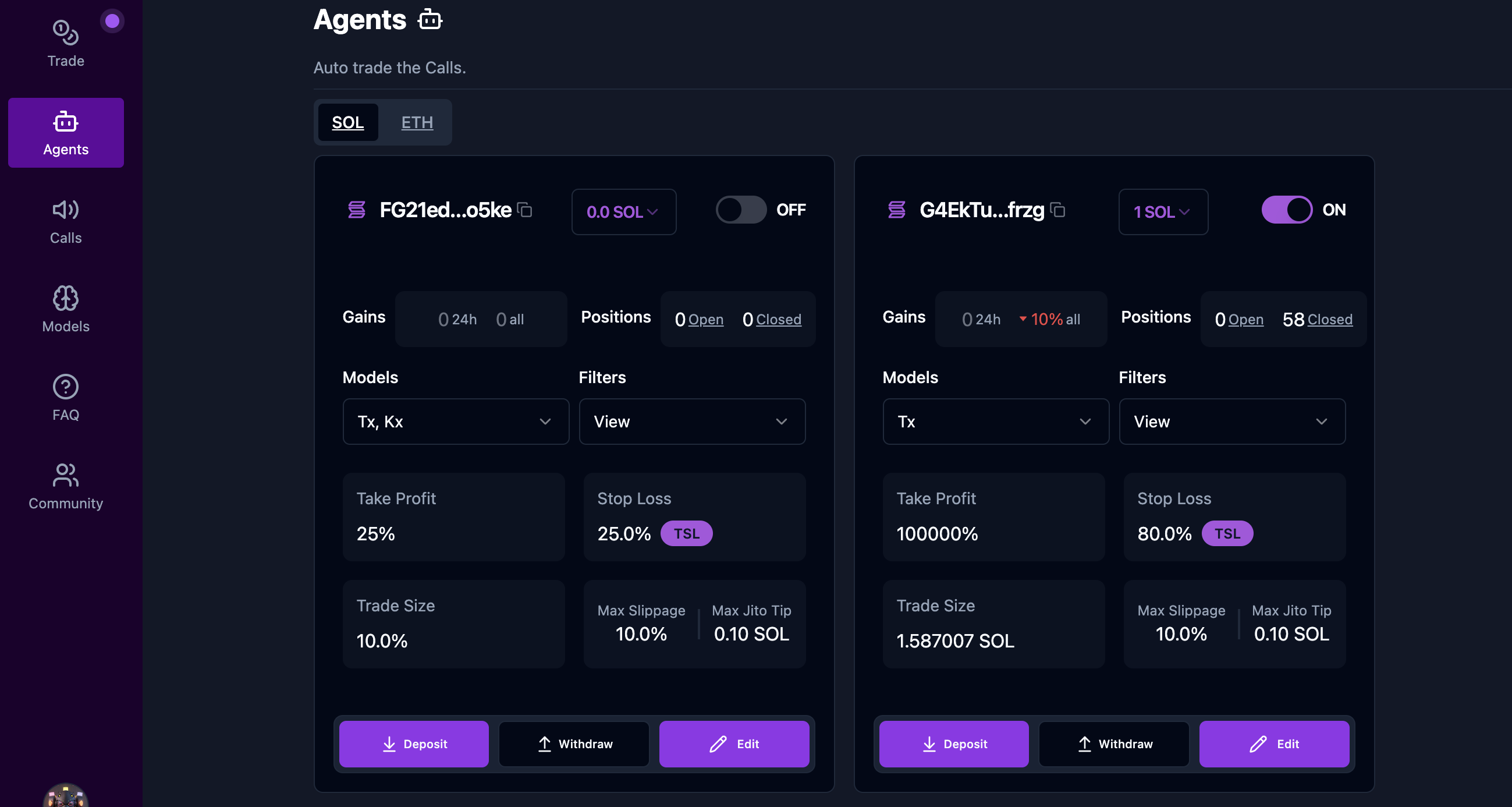
x.paal.ai is a robust trading platform that leverages AI models to provide automated and manual trading capabilities. The platform is structured to cater to traders of all levels, offering tools to take trades, configure models, and manage automated strategies. Below is the comprehensive guide to using x.paal.ai.
***
### **Side Menu**
The side menu provides a navigation hub to access various functionalities on the platform. Here’s an overview:
1. **Trade**:
* **Purpose**: Manually take trades.
* **Features**: Analyze market trends, select tokens, and execute buy or sell orders in real time.
2. **Agents**:
* **Purpose**: Automate trading strategies.
* **Features**: Set up and configure trading agents to execute trades based on predefined rules and AI models.
3. **Calls**:
* **Purpose**: Track token buy signals generated by models.
* **Features**: Access trading alerts and performance metrics for informed decision-making.
4. **Models**:
* **Purpose**: Configure and monitor AI models.
* **Features**: Create, modify, and analyze models generating trading signals.
5. **FAQ**:
* **Purpose**: Provide help and support resources.
* **Features**: Answers to frequently asked questions for smoother navigation.
6. **Community**:
* **Purpose**: Engage with the x.paal.ai user community.
* **Link**: [Join the Telegram Community](https://t.me/+Qa7mtuMOdmcxNzEx).
7. **Profile and Logout**:
* **Purpose**: Manage account settings and log out securely.
8. **Night Mode Toggle**:
* **Purpose**: Switch between light and dark themes for a better user experience.
***
### **Trade Section**
The **Trade** section enables users to manually execute trades. Below are the key features:
#### **Opening a Position**
1. **Search Token**:
* Use the search bar to locate tokens by name or pool address.
* Key token details such as name, volume, liquidity, and market cap are displayed.
2. **Trade Size**:
* Adjust the trade size using the slider or input field.
* Allocate a percentage (e.g., 25%, 50%) of your available balance.
3. **Take Profit**:
* Define the target percentage gain to automatically close the trade.
4. **Stop Loss (SL)**:
* Enable/disable the **Trailing Stop Loss (TSL)** feature to dynamically adjust the stop-loss level based on price movements.
5. **Max Slippage**:
* Set a maximum slippage percentage (<20%) to limit price variance during execution.
6. **Action Buttons**:
* **Cancel**: Discard the trade configuration.
* **Open Position**: Execute the trade.
***
### **Agents Section**
The **Agents** section allows users to set up and manage automated trading strategies.
#### **Managing Agents**
1. **Create or Edit an Agent**:
* Choose the AI models for the agent (e.g., Tx, Kx, Lx).
* Set trade size as a **Fixed Amount** or a **Percentage** of funds.
2. **Advanced Settings**:
* **Take Profit**: Set the profit percentage.
* **Stop Loss (TSL)**: Enable trailing stop-loss for dynamic risk management.
* **Max Slippage**: Define the acceptable slippage level.
* **Max Jito Tip**: Set transaction tip preferences for Solana trades.
3. **Agent Dashboard**:
* View agent performance, including:
* Gains over 24H and overall.
* Open and closed positions.
* Toggle agents **ON/OFF** to enable or pause automation.
4. **Wallet Management**:
* **Deposit** or **Withdraw** funds allocated to the agent.
***
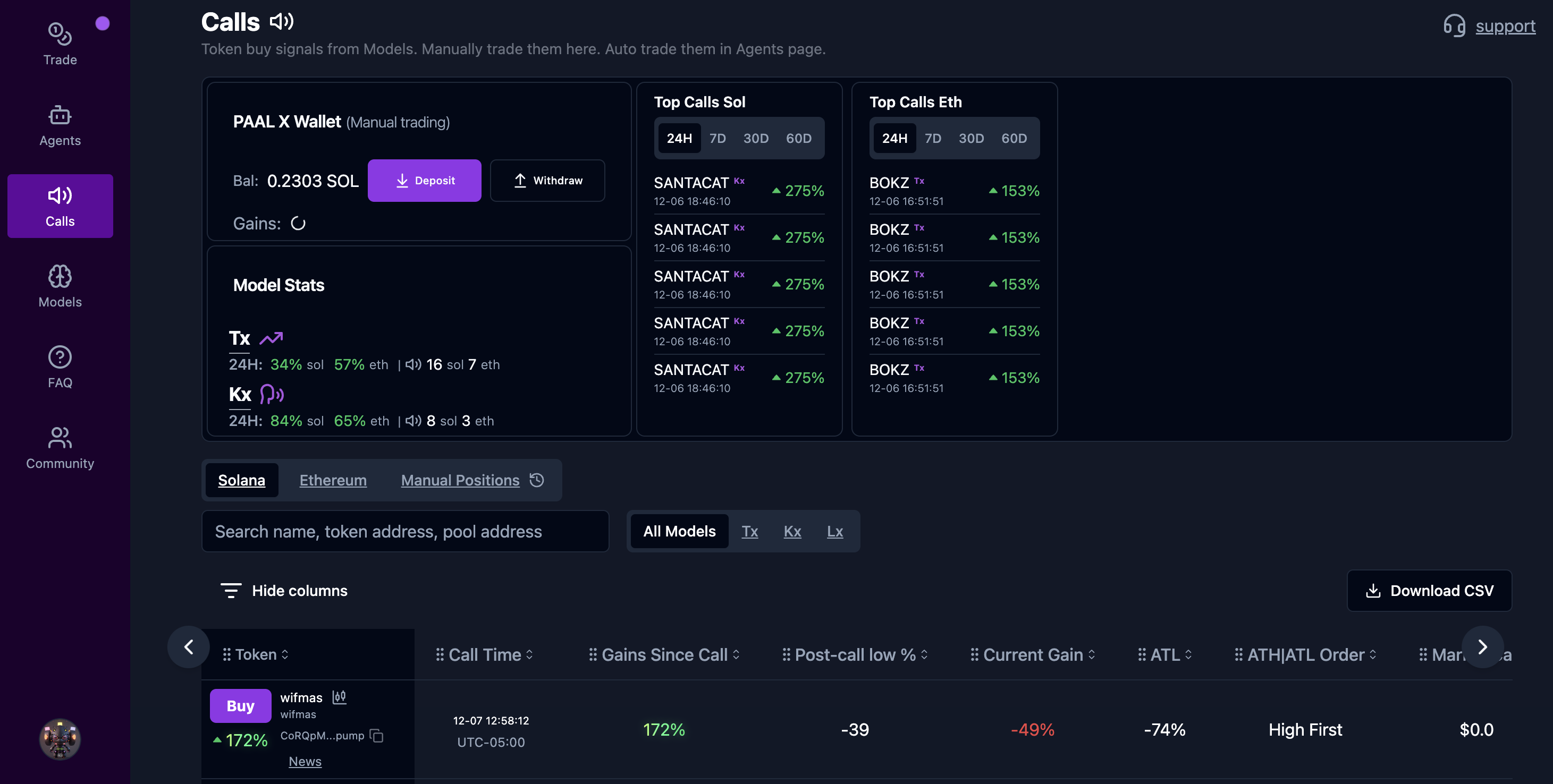
### **Calls Section**
The **Calls** section displays AI-generated trading signals for manual and automated trading.
#### **Features**:
1. **PAAL X Wallet**:
* Manage funds with **Deposit** and **Withdraw** options.
2. **Model Stats**:
* Track the performance of AI models over 24H, 7D, and 30D timeframes.
3. **Top Calls**:
* View top-performing tokens across different timeframes.
4. **Manual Trading Signals**:
* Search for tokens by name, address, or pool.
* Review detailed metrics:
* Gains since call.
* Current gain/loss percentage.
* All-Time High (ATH) and All-Time Low (ATL) performance.
* Export data as CSV for offline analysis.
***
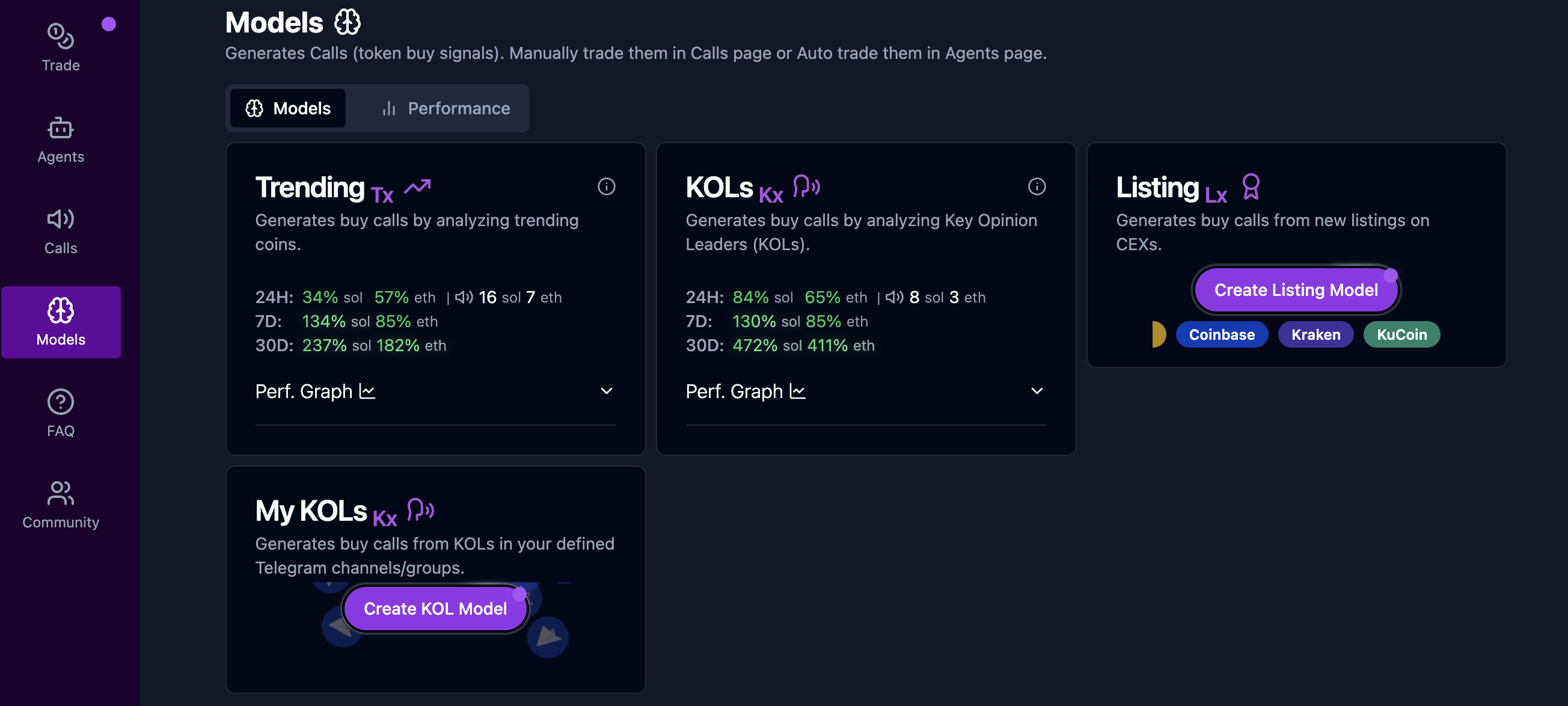
### **Models Section**
The **Models** section provides tools to configure and analyze AI-driven trading models.
#### **Available Models**:
1. **Trending (Tx)**:
* Analyzes trending coins and generates buy signals.
* Performance Metrics: Gains for Solana and Ethereum over 24H, 7D, and 30D.
2. **KOLs (Kx)**:
* Leverages Key Opinion Leaders’ (KOLs) signals for trading insights.
* Performance Metrics: Gains over 24H, 7D, and 30D.
3. **Listing (Lx)**:
* Generates buy calls from new listings on major centralized exchanges.
4. **My KOLs**:
* Create custom models for signals from specific Telegram KOLs.
#### **Custom Models**:
* Manage user-created models with options to edit, delete, or add new exchanges.
***
#### **Community Engagement**
* Join the discussion and connect with other users via the official **Telegram Group**: .
# AI Studio
### **Overview**
Paal AI Studio \[[app.paal.ai](https://app.paal.ai)] enables seamless interaction with AI tools through four primary modules:
1. **MyPaal**:
Create personalized AI bots with unique knowledge bases and tailored personalities.
* **Purpose**: Automate tasks, enhance user interaction, and provide a custom AI experience.
2. **Explore**:
Browse and discover a directory of advanced AI tools for diverse applications.
* **Purpose**: Select pre-built solutions or customize them to fit your needs.
3. **Creative Lab**:
Effortlessly create viral content using cutting-edge image and video generation tools.
* **Purpose**: Simplify and elevate your content creation workflow.
4. **Agents**:
Design and deploy AI agents to automate tasks and improve productivity.
* **Purpose**: Leverage agents for business, personal, or collaborative workflows.
***
### **Key Features**
* **Customization**: Build AI applications that cater to specific use cases, including chatbots, virtual assistants, and content creators.
* **Integration**: Tokenize your AI applications and integrate them seamlessly across web platforms.
* **Productivity**: Automate repetitive tasks and enhance efficiency through intelligent agents.
* **Creative Content**: Use advanced AI tools for image, video, and viral content generation.
***
### **How to Get Started**
1. Visit [Paal AI Studio](https://docs.paal.ai/ai-studio-app.paal.ai) to learn more about the platform.
2. Explore the tools available under **MyPaal**, **Explore**, **Creative Lab**, and **Agents**.
3. Use the intuitive interface to create, customize, and deploy your AI applications.
# Crypto Research Engine
**Ask.Paal** is a cutting-edge crypto research engine designed to empower users with real-time insights, analytics, and AI-powered solutions for cryptocurrency and blockchain projects. Below is a detailed guide to help users maximize their experience with the platform.
***
### **What is Ask.Paal?**
Ask.Paal combines advanced AI models with blockchain data to provide actionable insights on crypto projects. From answering user questions to offering token analytics and market insights, Ask.Paal is your go-to tool for crypto research and discovery.
***
### **Main Features**
1. **Ask Anything**:
* Use the search bar to ask crypto-related questions.
* Example questions:
* "What are the latest yield farming pools with the highest APYs?"
* "How has the price of Bitcoin changed in the past 24 hours?"
2. **Featured Projects**:
* Browse highlighted crypto projects, including partnerships and trending tokens like **Floki** and **AIT Protocol**.
* Quickly access key project details.
3. **Advanced AI Models**:
* Choose from various AI models like **PaalGPT**, **IBM WatsonX**, and others to refine your queries.
* Switch between models to tailor results for your needs.
4. **Research Dropdown**:
* **Utility Evaluation**: Understand the utility and use cases of tokens.
* **Tokenomics**: Analyze token supply, market cap, and price movements.
* **Community**: Explore the project's social engagement and reputation.
* **News about Token/CA**: Get the latest updates about the token or contract address.
5. **Chat History**:
* Access previous queries for easy reference.
***
### **Plugins & Tools**
Ask.Paal offers powerful tools to enhance user experience:
1. **Narratives Plugin**:
* Discover or create community-validated narratives about crypto trends and themes.
2. **PaalX Swap**:
* Execute token swaps directly on the platform.
3. **Voice Output**:
* Enable AI to respond to your queries with voice output for hands-free research.
4. **Image Search**:
* Search for token-related infographics and visuals.
5. **Audit Reports**:
* Access AI-generated audit insights on token smart contracts.
6. **Dark Theme**:
* Toggle between light and dark modes for a personalized experience.
***
### **How to Use Ask.Paal**
1. **Sign Up/Login**:
* Create an account or log in to access full platform features.
2. **Ask Questions**:
* Enter queries in the search bar to get tailored answers powered by AI.
3. **Explore Projects**:
* Browse through Featured Projects for real-time updates and analytics.
4. **Use Plugins**:
* Unlock additional functionality by enabling plugins in the settings menu.
5. **Analyze Tokens**:
* Use the Research menu for in-depth evaluations of token utility, market metrics, and community engagement.
***
### **Why Choose Ask.Paal?**
* **Real-Time Insights**: Stay ahead with up-to-date crypto data and analytics.
* **AI-Powered Research**: Leverage advanced models for accurate and tailored responses.
* **Seamless Navigation**: Intuitive interface for both beginners and experienced users.
* **Comprehensive Tools**: Plugins for deeper engagement and functionality.
***
### **Get Started**
Ready to explore the future of crypto research? Visit [**ask.paal.ai**](https://ask.paal.ai) today and start asking!
# AI Audits
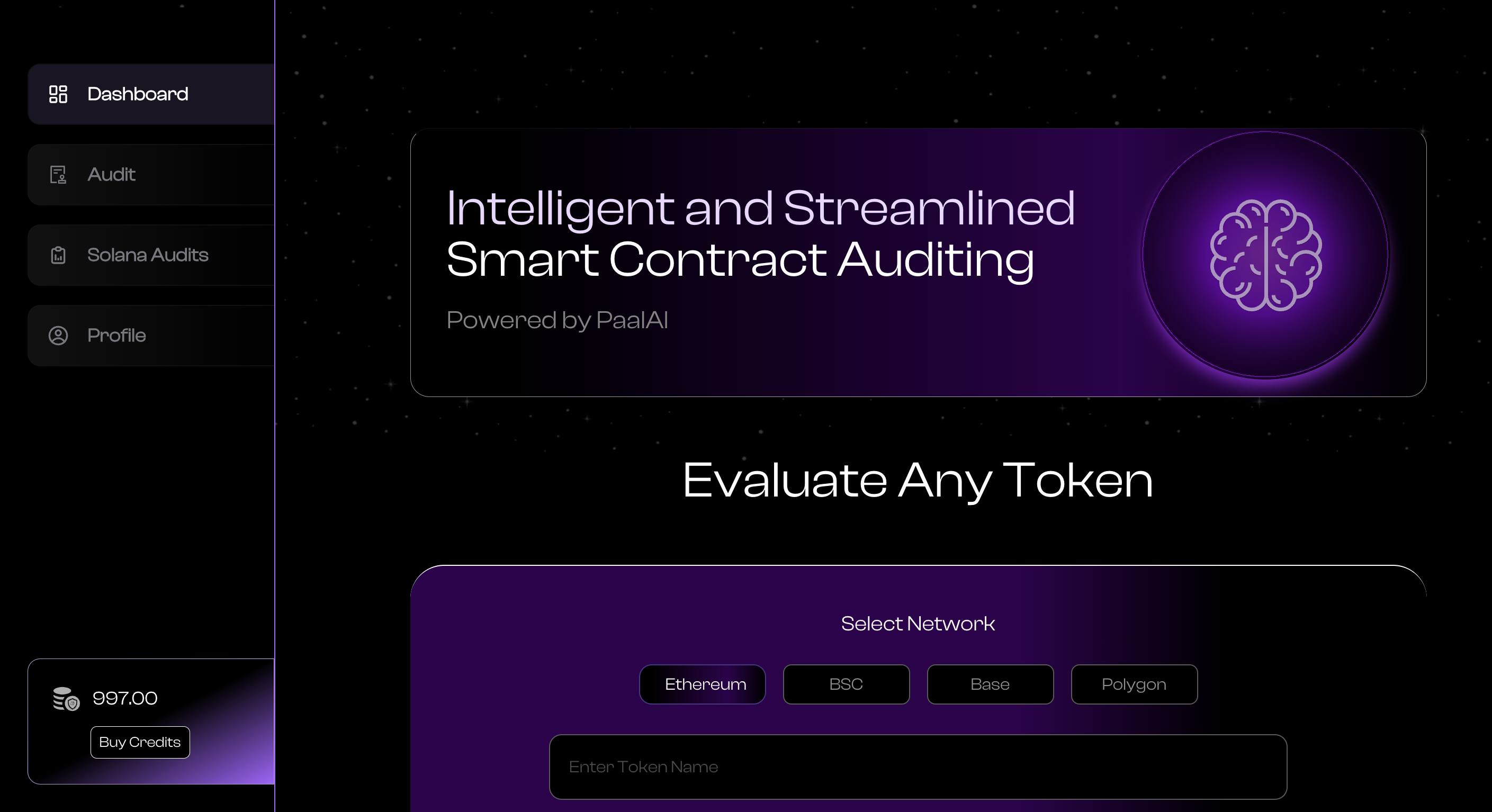
Welcome to [**Audit.Paal**](https://audit.paal.ai), the platform for automated smart contract security analysis. Audit.Paal supports multiple blockchain networks, providing security scores and insights for Ethereum, BSC, Base, Polygon, and Solana contracts. Below is a detailed guide for users and API integrations.
***
### **Platform Features**
#### **Dashboard**
* **Purpose**: Provides a central overview of token audits.
* **Features**:
* Select networks: Ethereum, BSC, Base, and Polygon.
* Input fields for token name and contract address to generate audits.
* Recent audit history displayed below for quick access.
***
#### **Audit History**
* **Purpose**: View completed and pending audits.
* **Features**:
* **Completed Audits**:
* Displays token name, network, and security score.
* Option to download audit reports or view detailed results.
* **Pending Audits**:
* Displays tokens with audits in progress.
* Allows users to track status updates.
***
#### **Solana Audits**
* **Purpose**: Generate audits specifically for Solana contracts.
* **Features**:
* Input token address to initiate an audit.
* Results provide comprehensive analysis of Solana contracts.
***
#### **Profile and Credits**
* **Purpose**: Manage user profile and available credits.
* **Features**:
* **Buy Credits**: Purchase credits for generating audits.
* Display of available credit balance for easy tracking.
***
### **API Documentation**
For developers, Audit.Paal provides an API for seamless integration into workflows. Below are the key API endpoints:
#### **Getting Started**
* **Purpose**: Submit a smart contract for automated security analysis.
* **Endpoint**:
```arduino
arduinoCopy codePOST http://44.216.8.86:3001/api/generate-audit
```
* **Payload Example**:
```json
jsonCopy code{
"token_name": "",
"token_address": "0xdA00000000000000000000000000000000000",
"chain_of_support": "ethereum",
"api_key": "845902c1-1234-5678-9011-db31d872asda"
}
```
#### **Audit Status**
* **Purpose**: Check the status of a previously requested audit.
* **Endpoint**:
```arduino
arduinoCopy codePOST http://44.216.8.86:3001/api/audit-status
```
* **Payload Example**:
```json
jsonCopy code{
"token_address": "0xdA00000000000000000000000000000000000",
"api_key": "845902c1-1234-5678-9011-db31d872asda"
}
```
#### **Solana Audits**
* **Purpose**: Generate audits for Solana smart contracts.
* **Endpoint**:
```arduino
arduinoCopy codePOST http://44.216.8.86:3001/api/solana-audit
```
* **Payload Example**:
```json
jsonCopy code{
"token_address": "0xdA00000000000000000000000000000000000",
"api_key": "845902c1-1234-5678-9011-db31d872asda"
}
```
***
### **How to Use Audit.Paal**
1. **Dashboard**:
* Select the desired network (Ethereum, BSC, Base, Polygon).
* Enter the token name and contract address.
* Click "Check" to initiate an audit.
2. **Audit History**:
* Navigate to the **Audit** section to view completed and pending audits.
* Download or review detailed security scores and reports.
3. **Solana Audits**:
* Use the **Solana Audits** tab to input the token address and generate a security analysis.
4. **Manage Credits**:
* View your credit balance on the sidebar and purchase more credits as needed.
***
### **Key Benefits**
* **Multi-Network Support**: Analyze contracts across Ethereum, BSC, Base, Polygon, and Solana.
* **Comprehensive Reports**: Access detailed security scores and potential vulnerabilities.
* **Developer-Friendly APIs**: Seamless integration for automated auditing.
***
### **Learn More**
For detailed API documentation, visit:\
[**Audit API Docs**](https://audit.paal.ai/api-docs)
Start securing your smart contracts today with Audit.Paal! Let me know if you'd like to add more details or refinements.
# GPU Rentals
Welcome to [**Deploy.Paal**](https://deploy.paal.ai), a platform designed to revolutionize AI model training and inference through on-demand **NVIDIA GPU instances**. Whether you’re building cutting-edge AI models or running high-performance computational tasks, Deploy.Paal offers the scalability and flexibility you need.
***
### **What is Deploy.Paal?**
Deploy.Paal provides on-demand access to powerful NVIDIA GPU instances, enabling you to train and infer AI models faster. The platform features a **credit-based usage system**, flexible pricing, and a user-friendly dashboard for seamless management.
***
### **Key Features**
#### **1. Scalable GPU Clusters**
* Deploy powerful GPU instances tailored for different workloads.
* Scale resources up or down to match your project’s demands.
#### **2. Credit-Based Usage System**
* Pay only for the resources you use with a transparent credit-based system.
* Purchase credits via **Stripe** or **Crypto**.
#### **3. User-Friendly Interface**
* Intuitive web app interface for easy instance configuration and monitoring.
* Customize your dashboard to display metrics and KPIs that matter to your workflow.
#### **4. Flexible Payment Options**
* Access affordable pricing starting at $0.07/hour, billed on a pay-as-you-go basis.
* Ideal for projects of all sizes, from startups to enterprises.
#### **5. 24/7 Support**
* Dedicated support to assist with any issues or questions.
#### **6. Security and Control**
* Secure your workloads with firewall rules, SSH keys, and team access controls.
* Real-time resource monitoring for proactive cost management.
***
### **Getting Started**
#### **Step-by-Step Guide**
1. **Assess Your Needs**:
* Determine your project’s infrastructure requirements (AI training, inference, or general computing).
* Evaluate which GPU instance suits your workload.
2. **Choose Your Instance**:
* Select from a range of instances optimized for different tasks:
* **g4dn.xlarge**: 1 GPU, 4 vCPUs, 16 GiB RAM, $0.07/hr.
* **g4dn.2xlarge**: 1 GPU, 8 vCPUs, 32 GiB RAM, $0.10/hr.
3. **Configure and Launch**:
* Customize settings like region, security, and team permissions.
* Launch your GPU instance with just a few clicks.
4. **Manage Resources**:
* Monitor active instances, runtime, and usage via a centralized dashboard.
* Pause, stop, or delete instances as needed to optimize cost and performance.
5. **Pay As You Go**:
* Purchase credits to pay for your usage.
* Scale up or down as your project grows.
***
### **Pricing**
| Instance Type | Hourly Rate\* | GPU | vCPUs | RAM | Storage |
| ---------------- | ------------- | --- | ----- | ------ | ---------------- |
| **g4dn.xlarge** | $0.07/hr | 1 | 4 | 16 GiB | 1 x 125 NVMe SSD |
| **g4dn.2xlarge** | $0.10/hr | 1 | 8 | 32 GiB | 1 x 225 NVMe SSD |
***
### **FAQs**
#### **1. What platforms can I connect to the GPU rental dashboard?**
Deploy.Paal supports integration with multiple AI and computational tools via secure APIs.
#### **2. How secure is my data on the platform?**
All data is encrypted and protected with advanced security protocols, including customizable firewall rules and SSH key access.
#### **3. Can I customize the dashboard to fit my needs?**
Yes, the dashboard is fully customizable to display key metrics and KPIs.
#### **4. How does the real-time resource monitoring feature work?**
The dashboard provides live updates on GPU usage, running time, and performance, ensuring transparency and cost optimization.
#### **5. What payment methods are supported for purchasing credits?**
Credits can be purchased using **Stripe** or **Coinbase Pay**.
#### **6. Can I scale my GPU resources as my project grows?**
Yes, instances can be scaled up or down based on your project needs.
#### **7. How do I manage team access and permissions?**
Deploy.Paal allows you to set team permissions and control access via a centralized admin panel.
For additional queries, contact our **Support Team** for quick assistance.
***
### **Why Choose Deploy.Paal?**
* **Affordable Pricing**: Starting at $0.07/hour, you can access high-performance GPUs without breaking the bank.
* **Flexibility**: Pay-as-you-go pricing and scalable resources ensure Deploy.Paal grows with your needs.
* **Ease of Use**: A simple, intuitive interface makes configuring and managing resources effortless.
***
###
# Paal Ecosystem
Welcome to the Paal Ecosystem! This documentation will guide you through the various features and components available on the [Paal Ecosystem website](https://ecosystem.paal.ai/).
[Coinmarketcap: Paal Ecosystem](https://coinmarketcap.com/view/paal-ecosystem/)
[Coingecko: Paal AI](https://www.coingecko.com/en/categories/paal-ai)
**Overview**
The Paal Ecosystem is a comprehensive suite of tools and information designed for users, investors, and developers. It includes sections on revenue, incubations, integrations, and products, providing a holistic view of the ecosystem's capabilities and offerings.
***
#### Sections of the Paal Ecosystem
**Revenue**
The revenue section provides detailed analysis and visual representation of the total revenue generated within the ecosystem. Users can view revenue data on a daily, weekly, monthly, and cumulative basis, allowing for a thorough understanding of financial performance over different time periods.
***
**Holdings**
This section details the various assets held within the Paal Ecosystem. It includes information on the quantity, percentage, and value of each asset, offering transparency and insight into the ecosystem's financial health and diversification.
***
**Incubations**
The incubation section highlights projects that are being developed and supported within the Paal Ecosystem. For example, the AIT Protocol is an initiative aimed at processing and analyzing big data efficiently. This section showcases innovative projects and provides information on their growth and development.
***
**Integrations**
The integrations section showcases recent partnerships and collaborations with various projects and platforms. It highlights the ecosystem's ability to work with different entities, enhancing its overall functionality and reach.
***
**Products**
The products section lists the various tools and applications available within the Paal Ecosystem. This includes MyPaalBot, PaalX, AI Web Widget and Paal AI Sniper. Each product is designed to offer unique functionalities, contributing to the ecosystem's versatility and utility.
***
#### Conclusion
The Paal Ecosystem is designed to provide a robust and dynamic environment for users, investors, and developers. It combines financial transparency, innovative project incubation, strategic integrations, and a diverse range of products to create a comprehensive and engaging experience. For more detailed information and to explore the full capabilities of the ecosystem, visit the [Paal Ecosystem website](https://ecosystem.paal.ai/).
# Token Information
**Token Name**: PAAL AI\
**Blockchain Platform**: Ethereum\
**Total Supply**: 1,000,000,000 (1 Billion)\
**Transaction Taxes**:
* **0%** on buys and sells
* **Smart Contract Renounced:** Ensuring transparency and security by relinquishing control over the token's smart contract.
#### **Why Hold $PAAL?**
1. **Revenue Sharing (RevShare):**\
A commitment to rewarding our community by sharing in the success of the ecosystem.
2. **Buybacks:**\
All tokens repurchased are redirected into staking pools, enhancing staking rewards and driving long-term token value.
3. **Staking Rewards:**\
Stake your $PAAL tokens to earn competitive rewards, benefiting from increased buybacks and ecosystem growth.
4. **Exclusive AI Services:**\
Unlock premium access to advanced AI tools and services by utilizing $PAAL, seamlessly integrating utility within the ecosystem.
# Staking
**How to Stake**
In order to stake and take part in the reward program, please follow the steps below:
1. Visit the Staking Platform: Go to rewards.paal.ai
2. Choose a Staking Pool: Select from one of the available pools – 14 days, 28 days, or 56 days
3. Understand the Rewards:
* PAAL Rewards: The PAAL rewards depend on the APY listed for the chosen pool and can be withdrawn anytime.
* ETH Rewards: The allocation of ETH rewards is as follows.
* 14 days: 1.2% of ETH rewards
* 28 days: 6% of ETH rewards
* 56 days: 92.8% of ETH rewards
**Staking APY \[Earning $PAAL]**
* 56 days: 15% APY
* 28 days: 10% APY
* 14 days: 3% APY
# Revenue Sharing
#### PAAL AI's Revenue-Sharing Model Integrated with Paal's Revenue Generation
**1. Sources of Revenue for Paal:**
* **Whitelisted AI Solution:** Paal offers a proprietary AI solution used by companies across industries, forming a primary revenue stream.
* **Advertising & Cross-Promotion:** Partnerships with other companies bring in additional profits.
* **Taxes from Trading (1%):** A unique aspect that directly impacts stakers.
* **PaalX Trading Fees:** Fees generated from trades executed on the PaalX platform contribute to the revenue stream, offering competitive rates for users while supporting operational growth.
* **Future Revenue Streams:** Subscription services and commissions from products offer potential growth in income.
**2. Allocation of Revenue:**
* **Paal Ecosystem Fund:** The revenues are transferred to a dedicated account named 'paalecosystemfund.eth' for purposeful utilization and ecosystem growth.
* **Distribution to Stakers:** An impressive 50% of certain earnings are allocated to stakers, promoting participation and stability.
**3. Integration with PAAL AI Revenue Sharing Plan:**
* **Staking Pools:** With various staking pools offering different APYs, stakers can choose a pool that fits their preference and investment strategy. The earnings from Paal's revenue streams contribute to the rewards within these pools.
* **Referral System & Auto-Compound Feature:** Enhancing community growth through referrals and compound interest adds layers of benefits and connects directly with the generated revenue, thereby attracting more participants.
* **Reward Claiming Mechanism:** This allows for a transparent and direct claiming process, encouraging users to engage actively with the platform.
* **Trading Volume Rewards:** The 1% share of all $PAAL trading volume creates an additional pathway for rewards, directly linking with Paal's unique tax on trading.
#### Claiming Rewards at rewards.paal.ai
The integration of PAAL AI's revenue-sharing model with Paal's revenue-generating methods forms a cohesive and dynamic structure. Token holders can claim their corresponding ETH rewards through the platform at [rewards.paal.ai](https://rewards.paal.ai).
# Staking Dapp \[rewards.paal.ai]
The Staking DApp serves as a platform for $PAAL holders to stake their tokens, enabling them to earn additional $PAAL tokens and $ETH. Below is a concise guide on how to utilize this application:
### Home Page
#### 🚀 ETH Rewards
Stake your $PAAL tokens and get rewarded in ETH! The pool has already distributed a stunning 826 ETH to our stakers. And this is just the beginning.
#### 💜 Staking Pools
Select from three staking durations, each with its unique benefits:
* **Short Term (14 Days):** Get started with a 3% APR and claim a 1.20% share of the ETH rewards.
* **Medium Term (28 Days):** Ramp up your earnings with a 10% APR and a 6% share of the ETH rewards.
* **Long Term (56 Days):** Maximize your returns with a 15% APR and a substantial 92.8% share of the ETH rewards.
#### ✨ Start Staking
Your "My Stakes & Rewards" dashboard awaits your first $PAAL stake. Dive into the pool that suits your staking style and watch your rewards grow.
#### 💡 Wallet at the Ready
Check your $PAAL balance right on the dashboard. With your wallet connected, you're all set to stake seamlessly.
#### 🔧 Need Help?
Our help and settings are just a click away, ensuring a smooth and user-friendly staking experience.
#### 🎉 Join the Staking Movement
Click on "Stake Now" for your chosen duration and become part of the thriving Paal staking community. Your journey towards earning more $PAAL and ETH starts today!
***
### Stake Screen
#### 🌐 **Choose Your Staking Term**
Delve into our diverse staking durations, each with a tailored APR to align with your financial aspirations:
* **14-Day Lockup:** For enthusiasts looking for swift rewards, enjoy a consistent 3% APR.
* **28-Day Lockup:** For the balanced strategist, a 10% APR offers a harmonious blend of time and profit.
* **56-Day Lockup:** For the visionary holder, a 15% APR rewards your dedication to the long haul.
#### 🔢 **Flexible Staking Amounts**
Whether you're testing the waters with a small amount of $PAAL or leveraging a significant portion of your assets, our platform accommodates your individual strategy.
#### 🔄 **Stay Informed with Real-Time Balance**
Your $PAAL balance is always in view, ensuring you're up-to-date with your holdings as you make staking decisions. Ready to amplify your investment potential? Our staking pools are prepared for you.
#### 🎇 **Easy Confirmation & Staking**
Set your desired staking amount and with a simple click on the "Stake" button, your tokens are actively earning for you.
#### ✅ **Transparent Staking Confirmation**
We prioritize clarity and control in your staking journey. Confirm the exact amount you wish to stake—transparency is paramount in our ecosystem.
#### 🎉 **Prepare for Rewards**
Post-staking, it's time to anticipate the growth of your earnings. Staking solidifies your role in bolstering the $PAAL network, enhancing its stability and prosperity.
***
### Contract Spend Approval
#### 1️⃣ **Clicking 'Stake'**
After selecting your staking option and inputting the number of $PAAL tokens you wish to stake, you'll proceed by clicking the ‘Stake’ button. This action prompts the platform to prepare your staking transaction.
#### 2️⃣ **Encountering the Spending Cap Request**
Following your initial action, you'll encounter a 'Spending Cap Request' screen. This is a standard safety measure in the decentralized finance space.
* **Why a Spending Cap?** Before the staking can actually take place, the smart contract needs your permission to access only the tokens you’re willing to stake. This is known as setting a spending cap.
* **Approval Transaction:** This is the first transaction you'll sign. It's not the staking transaction itself, but a necessary precursor that grants the smart contract permission to use the specific amount of $PAAL tokens you want to stake.
#### 3️⃣ **Understanding the Approval Screen**
On the approval screen, you will typically see:
* **Custom Spending Cap:** This figure represents the exact amount of $PAAL the smart contract is allowed to move from your wallet — only for the purpose you allow.
* **Data/Function:** This typically contains the ‘Approve’ function, signaling that you’re authorizing the transaction.
#### 4️⃣ **Confirming Your Decision**
Before you confirm:
* **Verify the Website:** Always ensure you are on the official Paal AI platform site.
* **Check the Cap:** Confirm that the spending cap matches the amount you wish to stake.
* **Examine the Transaction:** Look at the transaction details. If it shows 'Approve', it means you're giving the green light for your tokens to be staked up to the limit you set.
#### 5️⃣ **Signing the Transaction**
Once you’re comfortable:
* **Reject:** If something doesn't look right, you can always reject the transaction.
* **Next:** If all is in order, click 'Next' to sign the approval with your wallet. This won’t stake your tokens just yet; it's just setting the stage for the actual staking transaction to follow.
Remember, this approval step is a one-time setup per staking pool. Once approved, you won’t need to do it again unless you decide to stake additional $PAAL tokens beyond your set cap.
***
### Approval Time
🕒 **Transaction Confirmation Timing & Gas Tracker Insight**
After you’ve given the approval for the spending cap, the next step is the actual confirmation of the transaction on the blockchain. Here’s what you need to know:
#### Estimated Confirmation Duration
* The screen shows an estimated confirmation time of under 45 seconds. This is how long it typically takes for the network to process and confirm your transaction.
#### Gas Tracker
* The Gas Tracker icon indicates that this estimate is based on current network conditions, which can affect transaction costs and speeds.
* By clicking on the Gas Tracker, you can view real-time data on network congestion, which helps in estimating transaction fees and speeds.
Remember, this is an estimate and actual times may vary based on network traffic. Always ensure you're ready for any minor delays.
Once confirmed, your staking transaction is complete, and your $PAAL tokens are actively earning rewards according to the staking option you've chosen.
***
### Stake Transcation
🔒 **Finalizing Your Staking Contribution**
Now that you've set your spending cap, you're onto the last stretch: finalizing the staking transaction. This is where you'll officially send your $PAAL tokens to the staking contract. Here's what you should look for and how to proceed:
#### Staking Transaction Confirmation
* **Transaction Purpose:** The interface should indicate that this transaction is for staking, often shown near the top.
* **Transaction Details:** You'll see the estimated fee in ETH, reflecting the cost of executing the transaction on the blockchain.
* **Estimated Confirmation Time:** Look for an estimate like "Market \~30 sec" to understand how quickly the network is likely to process your transaction.
* **Total Cost:** This is the sum of your staking amount plus the gas fee, expressed in both ETH and your local currency for clarity.
#### Before You Confirm
* **Double-Check the Address:** Ensure the contract address you're sending to matches the official staking contract of Paal AI.
* **Review the Fees:** Gas prices fluctuate, so make sure you're comfortable with the fee at the time of transaction.
* **Know Your Totals:** The interface will display the total amount of ETH that will be deducted from your wallet, including the gas fee.
#### Confirming Your Stake
* Once you've reviewed all the details:
* Click **Reject** if you want to cancel the transaction.
* Click **Confirm** to proceed with staking your tokens.
#### What Happens Next?
After confirmation, your tokens are transferred to the staking contract, and you'll be officially participating in the Paal AI staking program. Depending on the network congestion, your transaction should be processed within the estimated time, but it could be quicker or slower.
Keep an eye on your wallet and the Paal AI platform for confirmation of a successful stake. You're now on your way to earning staking rewards!
***
### My Stakes and Rewards
#### Active Stake Details
* **15% APR:** You're earning at an annual percentage rate of 15%, reflecting the profit you make on your staked tokens over a year.
* **56 Day Lockup:** Your tokens are locked for staking for a period of 56 days, ensuring that you earn rewards during this time.
* **10,000 $PAAL Staked:** The total amount of $PAAL you have currently staked.
#### Rewards Earned
* **0 ETH Unclaimed ETH:** This is the amount of Ethereum you've earned but haven't claimed yet.
* **0.00114 $PAAL Earned $PAAL:** The number of additional $PAAL tokens you've accrued as staking rewards.
#### Lock Timer
* **Lock Remaining:** A countdown timer displaying the exact time left until your staking period ends. In this case, it shows 55 days, 23 hours, 59 minutes, and 13 seconds remaining.
#### Action Buttons
* **Compound ETH & Relock:** This option allows you to reinvest your earned ETH rewards back into staking, potentially increasing your future rewards. All tokens, including previously staked tokens, will be restaked based on the same time lock instead of starting again from the beginning. For example, if your time lock had 56 days remaining, it will continue as 56 days after restaking (or 28 days, 14 days, etc., depending on your original time lock).
* **Claim ETH & Relock:** You can claim your accumulated ETH rewards and simultaneously relock your $PAAL tokens to continue earning.
* **Claim $PAAL Rewards:** This allows you to retrieve the earned $PAAL tokens while leaving your initial stake intact.
* **Unstake:** Available after the lock period, you can withdraw your staked $PAAL tokens.
# Paal NFTs
{% content-ref url="/pages/zFFvGejIJkifVesG1afX" %}
[Beta Bots](/tokenomics/paal-nfts/beta-bots)
{% endcontent-ref %}
{% content-ref url="/pages/uZNDKmHBRf1lHWTS2tC3" %}
[PaalX Bots](/tokenomics/paal-nfts/paalx-bots)
{% endcontent-ref %}
# Beta Bots
**AI Odyssey: The Beta Bots - A Free NFT Collection by PAAL AI**
Embark on a journey into the realm of artificial intelligence with "AI Odyssey: The Beta Bots", a vibrant and whimsical NFT collection presented to you by PAAL AI. This collection, created in August 2023, offers a total of 213 unique digital collectibles, each symbolizing a step in the evolution of AI. Here's what makes this collection stand out:
**Key Highlights:**
1. **Free Collection for the Community:** PAAL AI generously offers this collection at no cost, making it an accessible and inclusive opportunity for everyone interested in AI and digital art.
2. **Unique Digital Collectibles:** Each NFT in the "Beta Bots" collection is a unique piece, illustrating the fun and playful aspects of AI.
**Learn More & Explore the Collection:** To dive deeper into "AI Odyssey: The Beta Bots" and to become a part of this exhilarating journey, visit the collection on OpenSea: .
# PaalX Bots
Welcome to the PaalX NFT Collection, a groundbreaking digital asset initiative designed to offer exclusive benefits and privileges to its holders. This documentation provides detailed information about the PaalX Xclusive NFTs, the array of benefits NFT holders can enjoy, and how these digital assets integrate with the PaalX v0.1 platform.
### Overview
The PaalX Xclusive NFT Collection represents a unique opportunity for enthusiasts and investors in the digital assets space. Holding a PaalX NFT is not just about owning a piece of digital art; it's about accessing a suite of exclusive benefits and features on the PaalX v0.1 trading platform.
### Exclusive Benefits
Owning a PAAL Xclusive NFT is more than just an investment; it's a commitment to being at the forefront of digital asset trading. Here's a closer look at the exclusive benefits you can enjoy as an NFT holder:
* **Zero Trading Fees:** Trade on the PaalX v0.1 platform without the burden of transaction fees. This benefit applies exclusively to NFT holders, offering a significant advantage in the trading landscape.
* **Passive Income Streams:** Participate in the distribution of trading volume fees collected on the platform. As the platform grows and the volume of trades increases, so does your potential for earning passive income.
* **Advanced Trading Functionalities:** Unlock special features and advanced trading options on the PaalX platform. These functionalities are designed to enhance your trading efficiency and effectiveness.
### Collection Details
The PaalX NFT collection can be viewed and accessed through the following link: [PaalX Bots Collection on OpenSea](https://opensea.io/collection/paalx-bots-collection).
This collection is your gateway to becoming a part of an exclusive group of traders and investors who value innovation, efficiency, and the potential of digital assets.
### Conclusion
The PaalX Xclusive NFT is not just an opportunity to own a unique digital collectible. It's an investment in your trading future, offering a suite of benefits designed to enhance your experience and profitability on the PaalX v0.1 platform. Join us in this exciting venture and become a part of the future of digital asset trading.
# MyPaalBot
[**MyPaal**](https://app.paal.ai/panel) empowers users to create and customize intelligent AI bots tailored to their specific needs. These bots can interact with users, automate tasks, and integrate with multiple platforms like Telegram or web widgets. Below is the complete guide to setting up a MyPaal Bot.
***
### **Step 1: Creating a New Bot**
1. Navigate to the **"Bots"** section from the top menu.
2. Click the **"+" icon** to create a new bot.
3. Enter the bot's **name** and basic details, then proceed to configure its settings.
***
### **Step 2: General Settings**
#### **1. Chat**
* Access the chat interface to test the bot’s responses in real time.
* Useful for debugging and live interaction.
#### **2. Tokenize**
* **Purpose**: Tokenizing your bot enables the creation of a unique digital token tied to your bot. These tokens allow you to incentivize user interactions, create monetization opportunities, and establish a token-based ecosystem for your bot.
* **Key Features**:
1. **Reward Users**: Distribute tokens to users for interacting with your bot, encouraging engagement and retention.
2. **Monetization**: Introduce premium features, gated access, or other services that users can unlock using the bot's token.
3. **Token Ecosystem**: Build a decentralized token economy around your bot to support gamification and community participation.
* **How to Tokenize Your Bot**:
1. Navigate to the **Tokenize** section of the bot settings.
2. Connect your wallet to enable token deployment.
3. Configure token details:
* **Token Name**: Choose a name that represents your bot.
* **Symbol**: Create a short symbol (e.g., BOTX).
* **Total Supply**: Define the total number of tokens available.
4. Deploy the token on a supported blockchain (Ethereum, BSC, Base, or Polygon).
* **How It Works**:
* Once tokenized, your bot automatically rewards users based on their interactions (e.g., messages sent, actions completed).
* Tokens can be used to unlock premium features or participate in your bot's ecosystem.
* **Example Use Cases**:
* Reward users for completing specific tasks or interacting with the bot.
* Charge users tokens for accessing exclusive content or services.
* Enable token staking for additional user benefits.
#### **3. Identify**
* Configure the bot’s identity:
* **Name**: Give your bot a meaningful name.
* **Description**: Add a short description of your bot (max 60 characters).
* **Category**: Assign the bot to a category (e.g., Finance, Support).
* Visibility Options:
* Make the bot visible or hidden in the **Explore/Marketplace**.
#### **4. Personality**
* Define your bot’s tone, behavior, and purpose:
* Use the **Personality Prompt** to describe how the bot should interact (e.g., friendly, professional, humorous).
* Select from templates or write a custom description.
* Example: "A helpful and friendly assistant that provides accurate crypto information."
***
### **Step 3: Adding Knowledge**
Enhance your bot’s intelligence by adding custom knowledge sources:
#### **Options for Custom Knowledge**:
1. **Documents**:
* Upload files such as PDFs, DOCX, TXT, or EPUB to add specific information.
2. **Links**:
* Provide web links for the bot to access and use relevant data.
3. **Smart Links**:
* Add structured links to specific datasets or APIs.
4. **Text**:
* Add text-based responses for specific queries.
5. **FAQs**:
* Build a list of Frequently Asked Questions for instant responses.
***
### **Step 4: Platform Settings**
#### **1. Telegram Integration**
* Connect your bot to Telegram:
* Generate a token for Telegram.
* Configure the bot for group or direct message interaction.
#### **2. Widget Integration**
* Create a custom widget to embed the bot on your website.
* Copy and paste the generated code to your site for seamless interaction.
#### **3. Share Your Bot**
* Share the bot via multiple platforms:
* **Telegram**
* **Discord**
* **Direct Link**
***
### **Step 5: Advanced Features**
#### **1. Trigger Words**
* Configure trigger words for specific actions:
* **Trigger Word**: Define the keyword that activates the bot.
* **Actions**:
* Run AI Commands.
* Post a message.
* Share a file.
* Add a custom prompt for each trigger word.
#### **2. Verified Users**
* Restrict bot usage to verified users.
* Grant access by adding specific users to a whitelist.
***
### **Step 6: AI Model Selection**
* **Purpose**: Choose from a variety of advanced Language Models (LLMs) to power your bot’s conversational abilities and task execution.
* **Available Models**:
1. **Grok**
2. **IBM Granite**
3. **IBM Mixstral 8**
4. **IBM Llama 3.1**
5. **GPT-3.5 Turbo**
6. **GPT-4o**
7. **GPT-4 Turbo**
8. **Gemini 1.5 Pro**
9. **Gemini 1.5 Flash**
10. **Gemini 1.0 Pro**
11. **Claude 3.5 Sonnet**
12. **Claude 3 Opus**
13. **Claude 3 Sonnet**
14. **Claude 3 Haiku**
* **How to Select an LLM**:
1. Navigate to the **Identify** or **Knowledge** section in your bot’s settings.
2. Select an LLM from the dropdown menu based on your requirements:
* **GPT-4 Turbo** for fast and accurate responses.
* **Claude 3 Sonnet** for nuanced and creative outputs.
* **IBM Granite** for specialized enterprise applications.
3. Save the changes to apply the selected model to your bot.
* **Why Choose the Right LLM**:
* Different LLMs cater to specific use cases:
* **General-Purpose Models**: GPT-3.5 Turbo, GPT-4 Turbo.
* **Creative Applications**: Dalle-3, Flux, Claude 3 Haiku, Claude 3 Sonnet.
* **Enterprise Use Cases**: IBM Granite, IBM Mixstral 8.
***
### **Step 7: Testing Your Bot**
1. Use the **Chat** tab to test bot responses.
2. Enter questions or commands to ensure the bot functions as expected.
***
### **Step 8: Managing Your Bot**
1. Access the **Dashboard** to monitor performance:
* View metrics like user interactions and successful task completions.
2. Edit the bot’s settings anytime to improve its functionality or update knowledge.
***
### **FAQs**
#### **1. Can I customize my bot’s appearance?**
Yes, upload a custom photo and configure its name, description, and personality.
#### **2. What knowledge formats are supported?**
Supported formats include PDFs, DOCX, TXT, EPUB, web links, and FAQs.
#### **3. How do I make my bot public or private?**
Toggle the **Visibility** option in the Identify settings to make the bot visible in the Explore/Marketplace.
#### **4. Can I restrict my bot to certain users?**
Yes, use the **Verified Users** feature to control who can access the bot.
#### **5. Is the bot compatible with multiple platforms?**
Yes, MyPaal bots can integrate with Telegram, Discord, web widgets, and more.
***
#### **ubscription Page: Upgrade to Paal Pro Plan**
The **Subscription** page in the Profile section allows you to explore and upgrade to advanced plans to unlock premium features for your MyPaal AI bot. Below are the details about available subscription plans and their benefits.
***
### **Plans and Pricing**
#### **1. Pro Plan**
* **Price**: $29.99 USD/month
* **Yearly Discount**: Save 40% (Pay $18/month when billed annually).
* **Features**:
* Access to **14+ LLMs**.
* **Custom LLM Support**: Tailor models to fit your needs.
* **Advanced Bot Export**: Seamlessly integrate bots with other platforms.
* **Advanced Tools** for bot customization.
* **Unlimited Bots**: Create as many bots as you need.
* **Unlimited Documents**: Upload and use documents without limits.
* **Priority Support**: Get faster resolutions for your queries.
***
#### **2. Enterprise Plan**
* **Features**:
* Includes all **Starter** and **Pro** features.
* **Dedicated Level One Support**: Personalized assistance from our team.
* Additional enterprise-grade tools and features:
* **Customized MyPaalBot** tailored to your requirements.
* 50,000 **Image Creations/Month**.
* **Website Widget Export**: Embed widgets on your website.
* **Custom AI Solution** for unique business needs.
* **How to Subscribe**: Click **Order Now** to contact the team for pricing and customization.
***
### **Testimonials**
#### **Kudos to the PAAL Team!**
*"Integrating PAAL AI into our community has truly enriched the user experience. The bot is fun and engaging, adding features like conversation summaries and playful roast functions. Implementation was smooth, and the impact has been incredible."*\
– **Drew, CEO of Amino Rewards**
***
#### **This is a Great Help!**
*"The interface is easy to use, and the bot handles a wide range of questions. Our team uses it mainly for market analysis, and it has been invaluable in answering general inquiries as well."*\
– **Metacade Team**
***
### **How to Upgrade**
1. Navigate to the **Profile** section.
2. Select the **Subscription** tab.
3. Choose your desired plan:
* **Pro Plan**: Click **Cancel Subscription** to manage or **Upgrade** to a yearly plan.
* **Enterprise Plan**: Click **Order Now** to contact the team.
***
### **Why Upgrade?**
* Unlock advanced features to supercharge your bots.
* Enhance user engagement with better tools and resources.
* Enjoy seamless bot integration and custom AI solutions tailored to your business needs.
### **Get Started Today!**
Visit the **MyPaal** section and create your personalized AI bot to enhance productivity and user engagement.
Let me know if you’d like to include additional details or features
# Tokenization
Tokenization on Paal AI allows you to create unique tokens tied to your bot, enabling monetization, community engagement, and revenue-sharing opportunities. This guide outlines the steps to tokenize your bots and the features available.
***
### **Overview of Tokenization**
Tokenization empowers bot creators by:
1. **Rewarding Users**: Incentivize users for interacting with your bot.
2. **Ownership and Monetization**: Generate a token tied to your bot for revenue sharing.
3. **APY and Engagement**: Allow users to earn rewards based on their interactions.
***
### **Steps to Tokenize a Bot**
#### **Step 1: Select a Bot**
1. Navigate to the **"Tokenize"** section in the **Tokens** tab.
2. Browse the available bots and choose the one you want to tokenize.
3. Configure visibility:
* Enable or disable **Visibility** to control whether the bot and its token are public.
***
#### **Step 2: Choose Tokenization Option**
1. **Launch a New Token**:
* Create a new token associated with the bot.
2. **Use an Existing Token**:
* Link your bot to a token you already own.
***
#### **Step 3: Configure Token Details**
1. **Upload Token Image**:
* Add an icon to represent your token.
2. **Token Details**:
* **Token Address**: Specify the blockchain address for the token.
* **Token Name**: Assign a meaningful name to your token.
* **Token Symbol**: Create a short, unique identifier (e.g., BOTX).
* **Token Description**: Briefly explain the purpose of the token.
3. **Social Media Links**:
* Add Telegram, Discord, or website URLs to connect with your community.
4. **Buy Details**:
* Add URLs for purchasing or trading the token (e.g., on Uniswap or Base).
***
#### **Step 4: Launch Token**
1. Review the configuration details.
2. Click **Create Token** to finalize and launch the token.
**For New Tokens:**
* Tokens are automatically launched on the **Base Chain** for security and scalability.
***
### **Token Creation Workflow**
1. **Pick a Coin You Like**:
* Select a token that aligns with your goals or project needs.
2. **Participate in Presale**:
* Launch a presale for early supporters.
* Allocate up to 20% of the token supply for presale participants.
3. **Deploy to Uniswap**:
* After the presale, deploy the token to Uniswap for trading.
* Adjust liquidity allocation and reserve unsold tokens for the pool.
4. **Liquidity and Rewards**:
* Allocate 70% of the supply for liquidity.
* Reserve 11% for user rewards based on engagement (e.g., tokens earned for interactions).
***
### **FAQs**
#### **1. What benefits do token holders get?**
Token holders can earn APY through engagement and participate in revenue-sharing opportunities.
#### **2. Can I use an existing token?**
Yes, bots can be linked to tokens you already own.
#### **3. How do I set token visibility?**
Use the **Visibility** toggle to make the bot’s token public or private.
#### **4. What platforms support token trading?**
Tokens can be traded on supported platforms like **Uniswap** or other DEXs.
***
Tokenizing bots on Paal AI enables a unique blend of monetization and community engagement, empowering creators to build sustainable ecosystems around their bots. Let me know if further clarifications are needed!
# Setup AI In Telegram
**Quick Guide to Creating Your AI Bot with @MyPaalBot**
1. **Initiate the Bot:**
* Send a message to **@MyPaalBot** on Telegram.
* Type `/start` to begin interacting with the bot, then click on "Create your AI Bot" or alternatively, you can enter the command `/setup`.

2. **Secure Sign-In:**
* Sign in with your Google Account or an existing paal.ai account to securely access your personal bot creation space.

3. **Bot Creation:**
* Select "Start!" to proceed.
* Choose "🧠🤖New AI Bot" to start crafting your unique AI bot. 
4. **Customize Your Bot:**
* Decide on a name for your bot, giving it a distinct identity.

* Define the bot's personality to determine how it will interact with users.
5. **Knowledge Integration:**
* After your bot is set up, click on "🧠Manage Knowledge" to begin teaching your bot.
* Enhance your bot's knowledge base by:
* Scraping content from websites.
* Uploading informative YouTube videos.
* Importing files (PDF, TXT, DOCX formats supported).
* Adding custom text entries.

6. **Edit Knowledge:** Furthermore, to keep your bot's responses relevant and accurate:
Select "**✏️Edit Knowledge**" to:

* **Rename Knowledge Sets:** Update the names of existing knowledge sets for better clarity or organization.
* **Remove Knowledge:** Delete any outdated or unnecessary information from your bot's database to maintain its efficiency.

7. **Activating Your Bot:**
* Once the knowledge has been uploaded, return to the previous menu.
* To activate your bot, select "❔How to activate." This will generate a bot ID (bid).
* Copy the bid and enter it in a direct message with the bot, or in a group chat where the bot will operate. Use the command `/set your_bot_id` to engage your bot for personal testing with `/paal`, or introduce @MyPaalBot to your group with `/set (+ bot_id)`.

8. **Interact with Your Bot:**
* Utilize the `/paal` command to query your bot on any topic. It will respond based on the personality settings and the knowledge you have provided.
9. **Bot Management:**
* Manage all your active bots by revisiting the `/setup` command. This section allows you to view and manage your bot list.

10. **Account Settings:**
* Adjust your linked accounts or log out using the settings icon. Here, you can add or disconnect your Google/Paal account as needed. 
By following these updated steps, you should now have a personalized AI bot ready to engage with users in a unique and informed manner!
# Creative Labs
**MyMemes.ai** is a dynamic platform in Creative Labs designed for meme creators, enthusiasts, and community builders. With MyMemes.ai, you can explore trending memes, create personalized content, and engage with a vibrant meme community.
***
### **Features Overview**
1. **Explore**
* Browse the latest and most popular memes created by the community.
* Filter by categories such as animals, gaming, politics, and more.
* View detailed meme profiles, including creator stats and recent uploads.
2. **Trending**
* Discover memes that are trending across various categories.
* Stay updated with viral content from the MyMemes community.
3. **My Memes**
* Manage all your created memes.
* Edit, delete, or share your content directly.
4. **Stats**
* Analyze performance metrics for memes, including views, likes, and shares.
* Access data on the most popular creators and trending content.
5. **Chats**
* Interact with AI-powered characters like **BigBrainPepe**, **Beaver**, and others for inspiration.
* Use the chat feature to describe your ideas and get tailored meme suggestions.
6. **Add Credits**
* Purchase credits to unlock premium meme-generation tools and features.
* Credits are used for advanced visuals, higher-resolution exports, and more.
***
### **Step-by-Step Guide**
#### **1. Creating a Meme**
1. Click on the **Create Meme** button in the left menu.
2. Fill in the required fields:
* **Name**: Give your meme a title.
* **Category**: Select the appropriate category (e.g., gaming, technology, frogs).
* **Description**: Provide a brief summary of your meme idea.
* **Personality**: Choose or customize a personality template for the meme.
3. Upload or generate visuals:
* Use the editing tools to create or enhance your meme design.
4. Click **Next** to finalize and save your meme.
***
#### **2. Engaging with AI Agents**
1. Select an AI agent (e.g., **BigBrainPepe**) from the **Chats** section.
2. Describe your idea or request inspiration in the chat box.
3. Use suggestions provided by the agent to refine your meme concept.
***
#### **3. Viewing and Sharing Community Memes**
1. Browse community memes by selecting a profile or category.
2. View all uploaded memes by the creator, including their:
* Meme count.
* Credit balance.
3. Share memes:
* Directly to social platforms or by generating a shareable link.
* Use the **Meme** or **Chat** tabs to engage further.
***
#### **4. Buying Credits**
1. Click on the **Add Credits** button.
2. Choose a credit package:
* $50 for 1,000 credits.
* $250 for 6,000 credits (Most Popular).
* $500 for 12,500 credits.
* $1,000 for 15,000 credits.
3. Complete the purchase using Stripe.
4. Credits will be added to your account immediately.
***
#### **5. Analyzing Meme Stats**
1. Navigate to the **Stats** tab.
2. View details like:
* Market cap.
* 1-day performance changes.
* Volume of interactions and community reach.
3. Use filters to sort stats by creators or memes.
***
### **Key Features**
* **Community-Driven Engagement**: Interact with creators and view their latest uploads.
* **AI-Powered Inspiration**: Collaborate with AI agents for meme ideas and feedback.
* **Seamless Sharing**: Share memes directly with your audience or save them for later use.
* **Advanced Customization**: Use credits for premium features like high-resolution exports and AI-enhanced visuals.
***
### **FAQs**
#### **1. How do I get started with MyMemes.ai?**
* Sign in, explore trending content, and click **Create Meme** to start creating.
#### **2. What are credits used for?**
* Credits are used for premium features such as advanced image editing, high-resolution memes, and additional storage.
#### **3. Can I share my memes outside of MyMemes.ai?**
* Yes, you can share memes via social media platforms or generate a public link.
#### **4. How do I interact with AI agents?**
* Select an agent from the **Chats** section, describe your idea, and receive suggestions or inspiration.
***
### **Get Started Today!**
Join the MyMemes.ai community to explore, create, and share memes that resonate with audiences worldwide.
For support or inquiries, contact ****.
# Agents
#### [**Paal AI Agents**](https://agents.paal.ai) **and System Features**
***
### **Overview**
**Paal AI** is a robust platform that allows users to create, deploy, and manage AI agents, workflows, and resources. It enables advanced automation, real-time monitoring, and customizable tools to enhance productivity and scalability.
Visit: [**agents.paal.ai**](https://agents.paal.ai)
***
### **1. Overview Page**
#### **Purpose**
The **Overview Page** serves as the central hub for monitoring activity, managing agents, resources, and media, and accessing critical insights like usage and performance.
#### **Features**
* **Plan Usage**:
* Tracks available credit balance and consumption percentage.
* Click **"View Usage"** for detailed insights into credit consumption.
* **Agent Stats Overview**:
* **Agent Activity**: Visualizes calls/tasks performed in the last 24 hours.
* **Tokens Generated**: Displays the number of input/output tokens processed over time.
* **Media Storage**:
* Categorizes stored media by type (e.g., Documents, Images, Videos, YouTube links, Audio).
* Enables file viewing and management directly from the dashboard.
* **My Agents**:
* Lists active agents with details like name, category, and creation date.
* Allows managing, editing, and deploying agents.
* **My Models**:
* Displays deployed AI models and provides a **"Deploy Model"** option for adding new ones.
* **Credit Grants USD**
* **Tracks Allocated and Available Credits**:
* Displays the total allocated credits, the remaining balance, and their expiration dates.
* **Purchase Additional Credits**:
* Click **"Get Credits with PAAL"** to buy more credits.
***
### **2. My Agents and Agent Marketplace**
#### **My Agents**
* **Key Features**:
* Categorizes agents as **Chat Agents** or **File Agents**.
* Provides quick actions:
* **Edit**: Modify agent settings.
* **Unpublish**: Change an agent’s availability.
* **Delete**: Permanently remove agents.
* **Agent Details**:
* Displays agent type, category, and status (e.g., Public, Pending).
* Allows filtering and searching for specific agents.
* **Agent Management**:
* **Create Agent**: Add new agents with custom configurations.
* **View All**: Access a complete list of agents with timestamps for tracking changes.
#### **Agent Marketplace**
* **Categories**:
* Includes agents for Marketing, Web3, IoT, Data Analytics, and more.
* **Agent Details**:
* Displays community ratings, category, and creator information.
* Provides quick deployment options using the **Add** button.
* **Actions**:
* **Search**: Find agents by name or type.
* **Copy ID**: Use for integrations and workflows.
***
### **3. Playground**
#### **Purpose**
A sandbox environment to test agents, workflows, and custom prompts in real-time.
#### **Key Features**
* **Multi-Agent Interaction**:
* Activate multiple agents simultaneously for collaborative tasks.
* **Preset Management**:
* Save commonly used setups for faster execution.
* **Execution Logs**:
* Monitor step-by-step execution plans and logs.
* **Output Options**:
* Download logs or view execution breakdowns.
#### **Steps to Use**
1. **Add Agents**:
* Choose agents from **Chat**, **File**, or **Default** categories.
2. **Input Prompts**:
* Enter text, document links, or audio/video URLs for processing.
3. **Run and Analyze**:
* Review execution logs and plans.
* Refine workflows using presets or modify agents.
***
### **4. Agents Flow Builder**
#### **Purpose**
An intuitive drag-and-drop tool to automate workflows using triggers, LLMs, and delivery nodes.
#### **Key Features**
* **Triggers**:
* Initiate workflows based on events like **Cron Schedules**.
* **LLM Nodes**:
* Integrate language models like GPT-4 Turbo with custom prompts.
* **Delivery**:
* Send results through Slack, Webhooks, Emails, or Phones.
* **Advanced Options**:
* Enable memory for context retention.
* Map outputs to specific delivery nodes.
#### **Steps to Build Workflows**
1. **Add Nodes**:
* Drag Trigger, LLM, and Delivery nodes to the canvas.
2. **Configure Nodes**:
* Set prompt instructions, assign agents, and choose delivery methods.
3. **Save and Test**:
* Link nodes, save the workflow, and test execution.
#### **Example Workflow: Automated Twitter Bot**
**Purpose**: Automate tweets combining data from Binance price feeds, GambleGPT picks, news, and weather updates.
**Workflow**:
1. **Trigger Node**: Set to run every 30 minutes.
2. **Data Sources**:
* **Binance Agent**: Fetch BTC and ETH prices.
* **GambleGPT**: Get sports betting picks.
* **News Agent**: Pull trending headlines.
* **Weather Agent**: Retrieve weather updates.
3. **LLM Node**: Combine inputs into an engaging tweet using GPT-4 Turbo.
4. **Delivery Node**: Post formatted output to Twitter.
**Example Tweet**:\
"📈 BTC: $45,000, ETH: $3,200 🔥 Lakers vs. Heat: +7 📰 Tech breakthrough 🚀 Weather: Sunny, 25°C #Crypto #Sports #News"
***
### **5. Bring Your Own Model (BYOM)**
#### **Deploying a Model**
* Search Hugging Face models by tags or keywords.
* Configure parameters like context length and repository tokens.
* Click **Deploy** to integrate the model.
#### **Deploying an Endpoint**
* Assign deployed models to scalable endpoints.
* Configure instance types (Inference 1x, 2x, or 3x) and scaling options.
* Deploy endpoints with automatic cost-saving features like **Scale-to-Zero**.
***
### **6. API Key Management**
#### **API Keys**
* **Features**:
* Create and manage secure API keys.
* Monitor usage and delete unused keys.
* **Best Practices**:
* Keep keys confidential and rotate them regularly.
#### **IoT (MQTT) Credentials**
* **Features**:
* Generate and manage credentials for IoT devices.
* **Best Practices**:
* Use unique credentials per device and delete unused ones.
***
### **7. Media Management**
#### **Storage**
* **Purpose**:
* Manage uploaded files for agents to process.
* **Features**:
* Sort files by date, size, or type.
* Assign files to agents.
#### **Usage**
* **Purpose**:
* Track storage activity and costs.
* **Features**:
* Monitor API requests and file processing.
* View cost breakdowns for efficient management.
***
### **8. Documentation**
#### **Contents**
* **Agent Types**:
* Explains Knowledge Agents, IoT Agents, and REST API Agents.
* **Integration Guides**:
* Step-by-step instructions for deploying and customizing agents.
***
### **FAQs**
#### **1. What are Paal AI Agents?**
Agents extend AI model functionality by enabling data processing, automation, and contextual interactions.
#### **2. How can I integrate an agent?**
Use the **Agent ID** for API-based integrations or deploy agents directly via the marketplace.
#### **3. What is BYOM?**
Bring Your Own Model lets you deploy custom AI models and endpoints for specialized tasks.
#### **4. How do I monitor costs?**
Check the **Usage** section in Media Management for detailed cost breakdowns.
***
# Creating Agents
Paal AI enables users to create custom agents to enhance workflows, automate tasks, and integrate external systems. Agents can be REST API agents, knowledge-based agents, or IoT (MQTT) agents. This documentation provides a comprehensive guide to creating and deploying agents.
***
### **Types of Agents**
#### **1. REST API Agent**
* **Purpose**: Integrate external APIs to execute custom actions or automate workflows.
* **Examples**: CRM integration, stock price fetching, email automation.
#### **2. Knowledge Base Agent**
* **Purpose**: Store and retrieve data from documents, audio, or videos to generate responses.
* **Examples**: Summarize uploaded documents, answer queries from uploaded datasets.
#### **3. IoT (MQTT) Agent**
* **Purpose**: Interact with IoT devices for real-time data collection and control.
* **Examples**: Manage smart devices, monitor environmental conditions.
***
### **Steps to Create an Agent**
#### **Step 1: Choose Agent Type**
1. Navigate to **"Create Agent"**.
2. Select the agent type:
* **REST API Agent**: Integrate external APIs.
* **Knowledge Base Agent**: Use uploaded data to create a responsive agent.
* **IoT (MQTT) Agent**: Set up for IoT device interaction.
3. Click **Next** to proceed.
***
#### **Step 2: Configure Basic Agent Details**
1. **Agent Name**:
* Assign a descriptive name (e.g., "Stock Price Fetcher").
2. **Agent Icon**:
* Upload an image to represent the agent visually.
3. **Agent Type**:
* Select from Chat Agent or File Agent based on the agent's purpose.
4. **Agent Category**:
* Assign a category for organization (e.g., Finance, Health, Data Analytics).
5. **Description**:
* Briefly describe what the agent does (e.g., "Fetches stock prices via API").
6. **Conversation Starters**:
* Add sample prompts or commands to guide user interaction (e.g., “Fetch the latest BTC price”).
***
#### **Step 3: Configurations**
**For REST API Agents**
1. **Operation ID**:
* Define the action the agent will perform.
2. **Keys and Authentication**:
* Add required fields such as API keys, tokens, headers, or query parameters.
* Specify if the fields are required or should be masked for security.
3. **OpenAPI Schema**:
* Import schema details from a URL or upload a JSON file to define API endpoints and capabilities.
**For Knowledge Base Agents**
1. **Upload Knowledge Files**:
* Add documents, videos, or audio files.
* Supported formats: PDF, TXT, DOCX, MP4, MP3, and more.
2. **Knowledge Scope**:
* Define whether the uploaded content will be global or specific to the agent.
3. **Privacy Policy**:
* Add terms to ensure data privacy compliance.
**For IoT (MQTT) Agents**
1. **Configure MQTT Credentials**:
* Set up broker details and credentials for device communication.
2. **Topics**:
* Define MQTT topics for publishing or subscribing to device data.
3. **Schema**:
* Add a schema to specify device interactions (e.g., set temperature, turn on lights).
***
#### **Step 4: Advanced Settings**
1. **Configurations Fields**:
* Add custom fields like API endpoints, environment variables, or user-defined parameters.
2. **Scope**:
* Choose whether the configuration is creator-defined or user-specific.
3. **Error Handling**:
* Add fallback actions for scenarios where the agent cannot complete a task.
***
#### **Step 5: Test and Deploy**
1. **Test**:
* Validate the agent using sample prompts or API calls.
* Adjust configurations if necessary.
2. **Deploy**:
* Click **Deploy** to make the agent available in the **My Agents** section.
3. **Post-Deployment Actions**:
* Assign the agent to workflows or integrate it using its unique Agent ID.
***
### **Examples of Agents**
#### **REST API Agent Example**
* **Name**: "Stock Price Fetcher"
* **Use Case**:
* Fetch stock prices from a financial API.
* Combine data with LLM prompts to generate daily financial insights.
* **Workflow**:
* Trigger: Daily at 9 AM (Cron Schedule).
* Fetch stock data via the agent.
* Use LLM to format insights and send via email.
#### **Knowledge Base Agent Example**
* **Name**: "Legal Document Analyzer"
* **Use Case**:
* Summarize and analyze uploaded legal documents.
* **Workflow**:
* Upload PDFs or Word files to the agent.
* Query the agent for summaries or specific clauses.
#### **IoT (MQTT) Agent Example**
* **Name**: "Smart Light Controller"
* **Use Case**:
* Manage smart lights in a home automation setup.
* **Workflow**:
* Trigger: Based on sunset time (API or Cron).
* Publish a "turn on lights" command to MQTT broker.
* Confirm via a status update.
***
### **FAQs**
#### **1. Can I combine multiple agents in one workflow?**
Yes, agents can be combined using the **Agents Flow Builder** to create complex workflows.
#### **2. How secure is the data uploaded to knowledge base agents?**
All uploaded data is encrypted, and sensitive data can be masked or restricted using privacy policies.
#### **3. Can I modify an agent after deployment?**
Yes, agents can be unpublished, modified, and redeployed as needed.
#### **4. How do I integrate agents with external applications?**
Use the agent's unique **Agent ID** for API-based integrations or link it in workflows.
# Sample Agents
#### **Sample Agents and Their Uses in Agent Workflows**
Paal AI provides a range of agents that can be combined in workflows to automate tasks, generate insights, and streamline operations. Here are examples of agent types and how they can be integrated into workflows.
***
#### **1. Data Analytics Agents**
* **Examples**:
* **Audio Agent**: Extract patterns or insights from audio data.
* **Video Agent**: Analyze video files for events or objects.
* **Spotify API Agent**: Fetch music trends and user data for analytics.
* **Workflow Use Case**:
* **Purpose**: Monitor trends in music or media platforms.
* **Workflow**:
* Use the **Spotify API Agent** to fetch trending tracks.
* Combine data with insights from the **Audio Agent**.
* Send aggregated reports via Slack or email using a Delivery Node.
***
#### **2. Finance Agents**
* **Examples**:
* **US Stock Technical Analysis Agent**: Generate stock trend predictions.
* **AnalyzeMyPortfolio**: Evaluate and optimize investment portfolios.
* **Workflow Use Case**:
* **Purpose**: Automate financial updates for clients.
* **Workflow**:
* Fetch stock price data using the **US Stock Technical Analysis Agent**.
* Analyze personal portfolio data with **AnalyzeMyPortfolio**.
* Use an LLM Node to format the information into an email update for the client.
***
#### **3. Health Agents**
* **Examples**:
* **AI-Powered Diet Planner API**: Generate personalized diet plans.
* **Air Quality Agent**: Monitor environmental conditions.
* **Workflow Use Case**:
* **Purpose**: Health tracking and recommendations.
* **Workflow**:
* Use the **Air Quality Agent** to assess the environment.
* Combine data with dietary suggestions from the **Diet Planner**.
* Send actionable insights to users via SMS or app notifications.
***
#### **4. General Knowledge Agents**
* **Examples**:
* **Gita Knowledge**: Provide spiritual guidance.
* **Document Agent**: Extract and summarize content from uploaded files.
* **Workflow Use Case**:
* **Purpose**: Create personalized educational resources.
* **Workflow**:
* Use the **Document Agent** to summarize a text-based document.
* Enhance with teachings from the **Gita Knowledge Agent**.
* Deliver the content to students or users through a web-based interface.
***
#### **5. Supply Chain Agents**
* **Examples**:
* **Amazon Shopping Agent**: Monitor product prices and availability.
* **Internet Shopping Agent**: Analyze e-commerce trends.
* **Workflow Use Case**:
* **Purpose**: Automate inventory management.
* **Workflow**:
* Use the **Amazon Shopping Agent** to track product availability.
* Feed this data into a Supply Chain Management System.
* Automate order placements using Webhook delivery.
***
#### **6. Research and Insights Agents**
* **Examples**:
* **Startup News Agent**: Fetch the latest news on startups.
* **Water Quality Management Agent**: Analyze environmental data.
* **Workflow Use Case**:
* **Purpose**: Automate research reporting.
* **Workflow**:
* Fetch data using the **Water Quality Management Agent**.
* Enhance with contextual insights using an LLM.
* Send a compiled report to stakeholders via Slack.
***
#### **7. IoT and Web3 Agents**
* **Examples**:
* **HTTP Cat**: Retrieve HTTP status explanations.
* **IoT MQTT Agents**: Manage lightweight device communications.
* **Workflow Use Case**:
* **Purpose**: Automate IoT system monitoring.
* **Workflow**:
* Use **IoT MQTT Agents** to monitor device activity.
* Trigger workflows based on device errors detected by **HTTP Cat**.
* Send alerts to the technical team via Email or Slack.
***
#### **Key Notes**
* **Flexibility**: Agents can be combined with LLMs and delivery nodes for dynamic workflows.
* **Customizable**: Each agent can be tailored to fit specific use cases.
* **Scalable**: Use multiple agents in parallel for complex tasks like market monitoring, analytics, or real-time updates.
# AI Web Widget
**Overview**
The PAAL AI Web Widget integrates artificial intelligence with cryptocurrency services, offering a variety of modes and tools. This widget can be embedded in your website or used within a dedicated portal to enhance user interaction through AI-driven commands and crypto-related inquiries.
**Getting Started**
1. **Accessing the Widget**: Locate the PAAL AI Widget on your website or the platform where it's hosted.
2. **Interface Introduction**: Familiarize yourself with the widget interface, which includes the following sections:
* **Header**: Displays the "PAAL AI Project" branding and a brief tagline.
* **Welcome Note**: A short description that introduces the purpose of the widget and invites user interaction.
* **Quick Help Options**: A set of predefined queries like "How to activate my bot?" to assist new users in navigating the widget’s features.
* **Modes**: Shortcut commands for quick access to specific functions, such as `/paal`, `/crypto`, `/web`, `/image`, `/meme`.
* **Official Links**: A collection of direct links to related resources such as "App", "Discord", "Docs", "Exchange", "GitHub", "LinkTree", "Telegram", "Website", "Whitepaper", "X-Twitter".
**Widget Features**
1. **AI Suggested Section**: This part of the widget offers suggested actions or commands that users can utilize to interact with the AI for various tasks.
2. **Modes**: Modes are essentially quick commands that trigger specific functionalities or tools within the widget. Detailed explanations for each mode should be provided here.
3. **Official Links**: This dropdown provides easy navigation to official resources associated with PAAL AI. Each link should be described with its purpose and what users can expect to find there.
**Custom Commands**
1. **Entering Commands**:
* At the bottom, there is an input field preceded by the `/paal` command indicator. Users can type and send custom commands or questions here.
2. **Using a custom command**:
* The `/crypto` command is an example of a custom command that can be entered into the widget to receive cryptocurrency-related information.
**"/crypto" Mode**
The /crypto mode in the PAAL AI Web Widget offers users a comprehensive suite of tools and reports tailored to cryptocurrency enthusiasts and traders. This mode provides up-to-date data, metrics, and insights essential for navigating the crypto market.
**Accessing /crypto Mode**
* To engage the /crypto mode, select it from the "Modes" dropdown within the PAAL AI Web Widget interface.
* This will expand the /crypto-specific options including "Reports," "Metrics," "Key Opinions," and "Charts."
**Features of /crypto Mode**
1. **Reports Section**:
* **Airdrops**: View upcoming and ongoing airdrop events for various cryptocurrencies.
* **Fresh Wallets**: Monitor newly created wallets on the blockchain for emerging trends.
* **Full Scan**: Conduct an extensive scan of the blockchain to gather detailed information and analytics.
2. **Metrics Section**:
* **ATH (All-Time High)**: Check the highest price ever reached by different cryptocurrencies.
* **All**: Access a comprehensive list of all available metrics for deep analysis.
* **Contract Address**: Look up the contract address of tokens to verify transactions and smart contract details.
* **Holders**: Find out how many holders there are for a particular cryptocurrency.
* **Snapshot**: Take a snapshot of the current state of the cryptocurrency market for later reference.
* **FDV (Fully Diluted Valuation)**: Calculate the valuation of a cryptocurrency if all its supply were in circulation.
3. **Key Opinions Section**:
* **News**: Stay updated with the latest cryptocurrency news from various outlets.
* **Tweets**: Read the latest tweets from influential crypto personalities and news sources.
* **Web**: Search for cryptocurrency-related content across the web.
* **YouTube**: Watch the latest cryptocurrency videos and analysis from content creators.
4. **Charts Section**:
* Access different time frames for cryptocurrency price charts such as 12 hours, 1 day, 1 hour, 1 month, 1 week, 4 hours, and 6 months.
**Using the /crypto Mode**
* Each option within the /crypto mode can be selected to access the specific report or data point.
* To perform a custom query, use the input field at the bottom where it says "/crypto ask or say command..." and type your command.
#### Other Modes
The PAAL AI Web Widget provides various modes to cater to different needs, such as AI inquiries, cryptocurrency information, web searches, image processing, and entertainment through memes. Each mode activates a distinct set of functionalities within the PAAL AI ecosystem.
**Accessing Different Modes**
* **Modes Selection**: Use the "Modes" dropdown menu on the PAAL AI Web Widget to switch between different modes such as `/paal`, `/crypto`, `/web`, `/image`, and `/meme`.
**Description of Each Mode**
1. **/paal Mode**:
* This is the default mode for general inquiries about the Paal Project and AI-related questions. It's suitable for users looking to understand more about the AI tools and capabilities offered by the PAAL AI platform.
2. **/web Mode**:
* Activating this mode allows users to search the internet directly from the widget. It's designed for users who need to look up information without leaving the PAAL AI interface.
3. **/image Mode**:
* This mode is used for interacting with image-based AI functionalities. Users can upload images to receive AI-driven insights, conduct image searches, or process images using AI tools available within the PAAL AI platform.
4. **/meme Mode**:
* For a lighter touch, the `/meme` mode offers entertainment by providing access to a collection of memes or the ability to create memes using AI. It’s a way to engage users with humor while still keeping them within the PAAL AI ecosystem.
**Using the Modes**
* **Interaction**: To activate a mode, simply click on the corresponding button within the "Modes" section.
* **Custom Commands**: Each mode can interpret typed commands differently. Users can enter specific commands or inquiries related to the activated mode in the "ask or say command..." input field.
**User Experience and Engagement**
* The widget ensures a seamless transition between modes to maintain user engagement and provide a cohesive experience.
* Customization options may be available for users to personalize their interaction within each mode.
🌟 **Interested in a Custom AI Widget?** 🌟
For a personalized experience tailored to your needs, contact us at ****. Our team is ready to help you integrate the power of AI into your project, community, or business. Don’t miss out on the opportunity to enhance your platform with a bespoke AI widget designed just for you!
# Configure
You can configure your entity directly within the AI bot page. For detailed instructions and specific guidance on how to tailor your bot's configuration, please refer to the relevant page provided.
{% content-ref url="/pages/1EaZOZWfBIia7KxvBCui" %}
[MyPaalBot](/ai-studio-app.paal.ai/mypaalbot)
{% endcontent-ref %}
# Discord
Certainly! Here's a revised description for the Discord Bot, focusing on its features and functionalities:
***
**Discord Bot: A New Era in Digital Interaction and Management**
**Introduction:** Welcome to the world of our advanced Discord Bot, an innovative tool designed to transform your Discord experience. This bot is not just a utility; it's an enhancement to your digital space, providing a blend of interaction, moderation, and customization.
**Key Features:**
1. **Seamless Integration:** Easily integrates into your existing Discord server, offering a user-friendly setup process.
2. **Interactive AI Chat Capabilities:** Engage in real-time conversations with AI-driven responses. Whether it's general queries, trivia, or specific topics, the bot provides informative and engaging interactions.
3. **User Engagement Features:** Host quizzes, polls, and interactive games to foster community engagement and fun.
4. **Integration with Other Services:** Connect with various external APIs and services for added functionalities, like weather updates, news feeds, or custom data retrieval.
5. **Security and Privacy:** Prioritize user data security with robust encryption and privacy protocols, ensuring a safe online space for your community.
# AI
You have the ability to export your bot to Discord by utilizing the deploy function. Detailed instructions on how to accomplish this can be found on the specified page.
{% content-ref url="/pages/xZxDStNFt6tiDSQSWlwd" %}
[Broken mention](broken://pages/xZxDStNFt6tiDSQSWlwd)
{% endcontent-ref %}
To initiate the use of the bot, simply call the command `/set "BID"`. Once configured, you can always interact with the bot by posing questions or commands using the syntax `/paal "question"`. This format provides a seamless way to engage with the bot and access its functionality.
# Gecko
**Gecko Command for Real-time Crypto Coin Metrics**
Fetch real-time crypto coin metrics from a trusted crypto data terminal using the **/gecko** command.
You can look up any coin metric or stat swiftly, including those of newly listed altcoins.
**Usage:**\
`/gecko $paal [metric or stat]`
**Examples:**
* For general metrics:\
`/gecko $paal metrics`
* For the contract address of the coin:\
`/gecko $paal contract address`
* To find out the all-time high of the coin:\
`/gecko $paal ath`
**Setting a Default Contract Address for the AI Bot**
In addition to fetching real-time crypto coin metrics, you can also set a default contract address for your AI Bot. This allows for quick and efficient retrieval of data for a specific cryptocurrency without needing to input the contract address each time.
**Usage:**
* `/setgecko [contract address]`
This command sets a default contract address for the AI Bot. Once set, you can simply use `/gecko [metric or stat]` without specifying the contract address each time.
**Example:**
1. To set the default contract:
* `/setgecko 0x123abc456def789ghi...`
2. Then, to retrieve the all-time high of the default coin:
* `/gecko ath`
###
# Summarize
To obtain a summary of the last specified number of chat messages, use the `/summarize` command followed by the desired number. For example, if you want a summary of the last 250 messages, simply enter: `/summarize 250`.
This command provides a concise overview of recent chat activity, making it easy to catch up or review key points.
# Web Search
**Web Command for Research and Project-specific Queries**
Use the **/web** command to either access custom pre-trained information specific to a project or to conduct in-depth research with the Internet as your data source.
The results are comprehensive, with response times varying depending on the request's complexity.
**Usage:**\
`/web $paal [your question or topic]`
**Examples:**
* For project-specific questions, like understanding tokenomics:\
`/web $paal tokenomics?`
* To find recent YouTube videos about the PAAL AI Token:\
`/web recent YouTube videos about PAAL AI Token`
* Curious about what Raoul Pal commented on AI crypto coins?\
`/web what did raoul pal say about AI crypto coins recently`
* To find out the best altcoins to invest in this week and the reasons:\
`/web best alt coins to buy this week and why`
* Need the phone number of Tony’s pizza in Soho?\
`/web Tony’s pizza soho phone number`
***
With the /web command, you can seamlessly navigate between project-specific details and broader Internet research to obtain the information you need. Remember to use the right syntax to ensure accurate results.
# Crypto Twitter
This feature is designed to keep you updated with the latest trends and insights from influential figures and accounts in the cryptocurrency space on Twitter.
**1. Discovering Specific Discussions**
* **Command**: `/cx`
* **Purpose**: Find out what specific crypto influencers or topics are being discussed by the top crypto Twitter accounts.
* **Example Usage**:
* If you want to know what a popular crypto influencer like YourPop is saying about a specific cryptocurrency like $PAAL, you would type:
```bash
/cx what is YourPop saying about $PAAL
```
* This command prompts the bot to fetch and display tweets or discussions from YourPop, particularly those mentioning $PAAL.
**2. Getting Top Crypto News from Twitter**
* **Command**: `/xnews`
* **Purpose**: Receive the latest and most popular posts from the top 500 crypto Twitter accounts.
* **Example Usage**:
* Simply use the command as is to get an overview of the trending topics and news in the crypto Twitter community:
```bash
bashCopy code/xnews
```
* This command will provide you with a summary or links to the top news stories or tweets shared by leading crypto Twitter accounts.
#### How These Commands Enhance Your Experience
* **Targeted Insights**: By specifying influencers or topics, you can get tailor-made updates that align with your interests or investment strategies in the crypto space.
* **Efficient Information Gathering**: The `/xnews` command is an excellent way to quickly catch up on the most relevant and talked-about news in the crypto community without needing to sift through individual Twitter accounts.
These features make the Crypto Twitter component of your Telegram Bot a highly efficient tool for staying informed about the latest trends, discussions, and news in the cryptocurrency world.
# Roast
#### `/roast` - Interactive Roasting Command
**Description**: Add some playful banter to your group conversations. With the `/roast` command, you can roast a group member. Ensure that you tag the member or reply to their message.
**Usage**:
```bash
/roast @username or reply to their message with /roast
```
**Examples**:
* Replying to John's message with `/roast`
* `/roast @JohnDoe`
# Toast
#### `/toast` - Interactive Toasting Command
**Description**: Spread positivity in your group chats. Use the `/toast` command to give a shoutout or toast to any group member. Remember to either tag the member or reply to their message.
**Usage**:
```bash
/toast @username or reply to their message with /toast
```
**Examples**:
* Replying to Jane's achievement with `/toast`
* `/toast @JaneDoe`
# Telegram
Welcome to the comprehensive guide for your Telegram Bot.
Equipped with a variety of features ranging from chat moderation to personalized reminders, this bot serves as a versatile tool, enhancing the functionality and interactivity of your Telegram experience.
Whether you're administrating a bustling community group or using the bot in a private chat, these features streamline tasks, automate interactions, and provide novel ways to engage.
# AI
You have the ability to export your bot to Telegram by utilizing the deploy function. Detailed instructions on how to accomplish this can be found on the specified page.
{% content-ref url="/pages/xZxDStNFt6tiDSQSWlwd" %}
[Broken mention](broken://pages/xZxDStNFt6tiDSQSWlwd)
{% endcontent-ref %}
To initiate the use of the bot, simply call the command `/set "BID"`. Once configured, you can always interact with the bot by posing questions or commands using the syntax `/paal "question"`. This format provides a seamless way to engage with the bot and access its functionality.
You have the flexibility to interact with the bot in a private chat using your unique BID, or you can incorporate it into a community chat. If you choose to use the bot within a community chat, please remember to grant it admin permissions. This ensures that the bot has the necessary access to function properly and engage with the community.
# Auto Announcements
We’ve added a feature that allows group admins to create announcements and schedule automated posts on Telegram effortlessly, ensuring everyone stays informed! 👨💻
Check out the setup guide below and stay tuned for upcoming informative video tutorials! 📈👇
**Setup Guide**
1. **Initiate the Setup**:
* Open the [MyPaalBot](https://t.me/mypaalbot) on Telegram.
* Type `/setup` to begin the setup process.
2. **Access the Announcement Feature**:
* From the main menu, select **Create & Manage AI Bots**.
* Choose **Add new** under the **Create announcement messages for this AI bot to post in groups it’s a member of** section.
3. **Name Your Announcement**:
* Enter a name for your announcement. Note: The name cannot start with a period (.) or contain a backslash ().
4. **Craft Your Message**:
* Type the announcement message you want the AI bot to post. Ensure it is clear and concise.
* You can add GIFs or other media by following the prompts.
5. **Schedule Your Announcement**:
* Enter the start date and time for the announcement in Eastern Standard Time (EST). Use one of the following formats:
* `mm/dd/yyyy hh:mm`
* Custom Text e.g., 'in 30 minutes', 'tomorrow at 4pm'.
6. **Set the Rhythm**:
* Choose the time interval for posting the countdown message. Options include 2 hours, 4 hours, 8 hours, 12 hours, 24 hours, hourly, or daily plans.
7. **Finalize and Save**:
* Review the details of your announcement.
* Confirm and save the setup. Your AI bot will now automatically post the announcement according to your schedule.
***
This guide will help you effortlessly create and manage announcements, keeping your group members up-to-date with the latest information.
# Image Generation
The /image command is a remarkable feature for generating custom images based on specific prompts or descriptions. This tool harnesses the power of advanced AI-driven image generation techniques to create unique, visually appealing images tailored to your specifications.
**Usage**: /image \[detailed description of the image you want to generate]
With the /image command, you have the ability to create a wide range of images, from abstract concepts to detailed scenes. Whether you need an image for a project, a creative idea, or just for fun, this command can bring your vision to life.
**Examples**:
* To generate an image of a futuristic cityscape at night: `/image futuristic cityscape at night`
* For an artistic representation of a mythical creature in a forest: `/image mythical creature in an enchanted forest`
* To create an image of a serene beach scene at sunset: `/image serene beach scene at sunset`
* For a depiction of a historical event or figure: `/image renaissance-era historical figure in a palace`
This command is particularly useful for artists, designers, content creators, and anyone in need of custom imagery. The AI's ability to interpret and visualize complex descriptions ensures that each image is unique and aligned with the user's vision.
# Vision
The `/see` command functions as an image analysis tool, offering detailed insights into the content of an image. To use it effectively, you should provide a specific prompt that guides the analysis towards what you're most interested in learning about the image. This prompt helps in focusing the analysis on particular aspects such as identifying objects, understanding the scene, recognizing text, or even inferring the mood or context of the image.
**Usage**: `/see "prompt" [Attached Image]`
Your prompt should be clear and concise, indicating what type of information you are seeking from the image. This specificity helps in generating more relevant and accurate results.
**Examples**:
* To identify and understand the flora in a nature photograph: `/see "Identify the types of trees and flowers in this image" [Attach nature photograph]`
* For a detailed analysis of an artwork: `/see "Describe the art style and possible historical context of this painting" [Attach artwork image]`
* To extract and interpret text from a sign or document: `/see "Read and explain the text in this image" [Attach image with text]`
* For insights into a historical photograph: `/see "Provide historical context and possible date of this photograph" [Attach historical image]`
Remember, the effectiveness of the `/see` command depends significantly on the clarity of the image and the specificity of your prompt. High-quality images with clear details yield better analysis.
# Crypto Search
### AI Crypto Search Engine
#### Overview
The MyPaal bot’s AI Crypto Search Engine on Telegram is a powerful and dynamic feature that offers users a wealth of information about any cryptocurrency project. It's an intuitive tool for anyone looking to dive deep into crypto analytics and project insights.
#### How to Use the Search Engine
* Enter the command `/crypto [Token Symbol]` to get data on a specific cryptocurrency, such as `/crypto $PAAL`.
#### Key Features and Outputs
The search engine delivers extensive data including:
* **Comprehensive Project Overview**: A brief description of the project, outlining its primary use case, goals, and technology.
* **Real-Time Pricing**: The most up-to-date price of the cryptocurrency.
* **Market Metrics**: Details on Market Cap, Volume, Price Changes, and Supply figures.
* **Investor Insights**: Information on the number of token holders.
* **Blockchain Details**: The token’s blockchain address for authenticity verification.
* **Direct Links**: Access to the project's official site, social channels, and technical documents.
* **Sector Categories**: Classification of the crypto project by industry or technology sector.
#### Additional In-depth Features
Selecting 'See More' gives users access to:
* **Analytical Reports**: Deep dives into the cryptocurrency's performance and stats.
* **Key Opinion Leader (KOL) Insights**: Commentary from thought leaders in the crypto space.
* **Market Sentiment**: The general mood and outlook based on market data.
* **Visual Charts**: Graphical representations of historical and current price movements.
* **Educational Content**: Videos from YouTube providing further explanations and insights.
* **Comparison Tools**: Capability to compare the selected crypto with peers.
#### Interactive Purchase Option
* **Buy \[Crypto]**: An easy-to-use button to start the purchasing process for the selected cryptocurrency.
#### Versatility and Assistance
This feature supports queries for a wide range of cryptocurrencies and offers user assistance through community interaction and support channels.
# Gecko
**Gecko Command for Real-time Crypto Coin Metrics**
Fetch real-time crypto coin metrics from a trusted crypto data terminal using the **/gecko** command.
You can look up any coin metric or stat swiftly, including those of newly listed altcoins.
**Usage:**\
`/gecko $paal [metric or stat]`
**Examples:**
* For general metrics:\
`/gecko $paal metrics`
* For the contract address of the coin:\
`/gecko $paal contract address`
* To find out the all-time high of the coin:\
`/gecko $paal ath`
**Setting a Default Contract Address for the AI Bot**
In addition to fetching real-time crypto coin metrics, you can also set a default contract address for your AI Bot. This allows for quick and efficient retrieval of data for a specific cryptocurrency without needing to input the contract address each time.
**Usage:**
* `/setgecko [contract address]`
This command sets a default contract address for the AI Bot. Once set, you can simply use `/gecko [metric or stat]` without specifying the contract address each time.
**Example:**
1. To set the default contract:
* `/setgecko 0x123abc456def789ghi...`
2. Then, to retrieve the all-time high of the default coin:
* `/gecko ath`
### Managing Contract Addresses
To ensure the AI Bot's adaptability and management of multiple cryptocurrencies, the following command can be utilized:
#### Usage:
`/unsetgecko [contract address]`
This command removes the specified contract address from the AI Bot's memory. Subsequently, you will need to provide a contract address when using the `/gecko` command.
#### Example:
* To remove the default contract address: `/unsetgecko 0x123abc456def789ghi...`
After executing the `/unsetgecko` command, to fetch the all-time high or any other metric for a coin, you must include the contract address again: `/gecko $paal ath`
# Chart
The `/chart` command in our Telegram bot provides a powerful tool for visualizing financial data in various chart formats. This command is especially useful for traders and analysts who need quick access to market data presented in an easy-to-understand graphical format. Below is a detailed guide on how to use the `/chart` command.
### Command Syntax
```css
/chart [ticker] [timeframe] [chart type]
```
* **\[ticker]**: The stock or cryptocurrency ticker symbol.
* **\[timeframe]**: The desired timeframe for the chart.
* **\[chart type]**: *(Optional)* Type of chart to display (e.g., Candlestick, Bar, Histogram, Line).
### Chart Types
1. **Candlestick**
2. **Bar**
3. **Histogram**
4. **Line**
### Timeframes
#### For Periods Less Than 1 Day
* **Available Values (Day)**: 1
* **Available Values (Hour)**: 1, 4, 12
* **Available Values (Minute)**: 1, 5, 15
#### For Periods More Than 1 Day
* Users can specify timeframes such as Week, Month, Year.
* **Predefined Values**: 1, 7, 14, 30, 90, 180, 365 days
#### Data Granularity
* **1 - 2 Days**: 30-minute intervals
* **3 - 30 Days**: 4-hour intervals
* **31 Days and Beyond**: 4-day intervals
### Sample Prompts
1. `/chart $ATOR`
* Displays a default chart for the $ATOR ticker.
2. `/chart $PAAL 1min`
* Displays a 1-minute timeframe chart for the $PAAL ticker.
3. `/chart $PAAL 5 min histogram`
* Displays a 5-minute histogram chart for the $PAAL ticker.
### Custom Prompts
Users can combine different tickers, timeframes, and chart types to customize their chart. Examples:
1. `/chart $XYZ 1D candlestick`
* Displays a daily candlestick chart for the $XYZ ticker.
2. `/chart $ABC 3M line`
* Displays a 3-month line chart for the $ABC ticker.
3. `/chart $123 1Y bar`
* Displays a yearly bar chart for the $123 ticker.
### Notes
* Ensure that the ticker symbol is correct and supported by the bot.
* Timeframes and chart types should be specified in a format recognized by the bot.
* For best results, use the predefined timeframes and data granularity options.
# Web Search
**Web Command for Research and Project-specific Queries**
Use the **/web** command to either access custom pre-trained information specific to a project or to conduct in-depth research with the Internet as your data source.
The results are comprehensive, with response times varying depending on the request's complexity.
**Usage:**\
`/web $paal [your question or topic]`
**Examples:**
* For project-specific questions, like understanding tokenomics:\
`/web $paal tokenomics?`
* To find recent YouTube videos about the PAAL AI Token:\
`/web recent YouTube videos about PAAL AI Token`
* Curious about what Raoul Pal commented on AI crypto coins?\
`/web what did raoul pal say about AI crypto coins recently`
* To find out the best altcoins to invest in this week and the reasons:\
`/web best alt coins to buy this week and why`
* Need the phone number of Tony’s pizza in Soho?\
`/web Tony’s pizza soho phone number`
***
With the /web command, you can seamlessly navigate between project-specific details and broader Internet research to obtain the information you need. Remember to use the right syntax to ensure accurate results.
# Crypto Twitter
This feature is designed to keep you updated with the latest trends and insights from influential figures and accounts in the cryptocurrency space on Twitter.
**1. Discovering Specific Discussions**
* **Command**: `/cx`
* **Purpose**: Find out what specific crypto influencers or topics are being discussed by the top crypto Twitter accounts.
* **Example Usage**:
* If you want to know what a popular crypto influencer like YourPop is saying about a specific cryptocurrency like $PAAL, you would type:
```bash
/cx what is YourPop saying about $PAAL
```
* This command prompts the bot to fetch and display tweets or discussions from YourPop, particularly those mentioning $PAAL.
**2. Getting Top Crypto News from Twitter**
* **Command**: `/xnews`
* **Purpose**: Receive the latest and most popular posts from the top 500 crypto Twitter accounts.
* **Example Usage**:
* Simply use the command as is to get an overview of the trending topics and news in the crypto Twitter community:
```bash
bashCopy code/xnews
```
* This command will provide you with a summary or links to the top news stories or tweets shared by leading crypto Twitter accounts.
#### How These Commands Enhance Your Experience
* **Targeted Insights**: By specifying influencers or topics, you can get tailor-made updates that align with your interests or investment strategies in the crypto space.
* **Efficient Information Gathering**: The `/xnews` command is an excellent way to quickly catch up on the most relevant and talked-about news in the crypto community without needing to sift through individual Twitter accounts.
These features make the Crypto Twitter component of your Telegram Bot a highly efficient tool for staying informed about the latest trends, discussions, and news in the cryptocurrency world.
# Welcome
To set up a welcome message, simply compose your custom greeting and follow it with the command:
```bash
/addwelcome your custom message
```
* **Enabling/Disabling the Welcome Message:** Control the welcome message with ease by using:
* `/welcome on` to enable
* `/welcome off` to disable
* **Previewing the Welcome Message:** After defining your custom message, you can preview it by entering:
* `/prevwelcome`
* **Custom Formatting Options:** Enhance your messages by utilizing the following syntax:
* `{username}` to display the user's first name
* `{chatname}` to display the name of the group
* `*bold*` for bold text
* `_italic_` for italicized text
* `\\\underline///` for underlined text
* `~strikethrough~` for strikethrough text
* `|||spoiler|||` for spoilers
* `` `code` `` for code formatting
* **Appending a Button:** You can add interactive buttons by using:
* `[Button label](link)`
# Filters
To create a filter based on specific keywords, you can utilize the following syntax:
* **For Text-Based Filters:**
* Example:
```css
/addfilter [keyword] message to be sent
```
This command associates a given keyword with a specific message that will be sent in response.
* **For Media-Based Filters (including audio, picture, or video):**
* First, select the desired media file.
* Then, use the command in the file's caption, as follows:
```css
/addfilter [keyword] message to be sent
```
In this context, the accompanying message is optional.
# Summarize
To obtain a summary of the last specified number of chat messages, use the `/summarize` command followed by the desired number. For example, if you want a summary of the last 250 messages, simply enter: `/summarize 250`.
This command provides a concise overview of recent chat activity, making it easy to catch up or review key points.
# AutoSum
#### `/autosum` - Auto-summarization Command
**Description**: Keep yourself updated with the latest conversations. By enabling the `/autosum` command, you'll receive summarized updates of group chats every 8 hours.
**Usage**:
```vbnet
vbnetCopy code/autosum ON to enable auto-summarization
/autosum OFF to disable auto-summarization
```
**Examples**:
* `/autosum ON`
* `/autosum OFF`
# Moderation Tools
🎙️ **Voice of the Chat**:
* Silence the noisy: `/mute`.
* Give voice back: `/unmute`.
🚫 **Guardians at the Gate**:
* Ward off the mischief-makers with a username: `/ban @username`.
* Embrace forgiveness and redemption: `/unban @username`.
*Note: Admins are the pillars of your chat, and thus, they stand immune to bans.*
🎖️ **Lead & Serve**:
* Uplift the worthy: `/promote`.
* Adjust the ranks: `/demote`.
⚠️ **Caring yet Firm**:
* Send out a gentle warning: `/warn`.
* Peek into a user's warning tally: `/warns`.
* Offer grace and forgiveness: `/removewarn`.
* Be the judge with warning thresholds: `/warnlimit`.
* Decide the fate of repeat offenders: `/warnmode`.
# Flood Control
#### **Wave off the Flood**:
💬 **Harmony in Conversation**:
* Define the boundaries with flood limits: `/setflood [number]`.
* Keep the peace by setting the flood consequences: `/floodmode`.
# Reminder
#### ⏰ **Your Personal Timekeeper**:
📝 **Memo to Self**:
* A nudge from the future, set for an hour or a day: `/reminder 1h` or `/reminder 1d`.
🧠 **Memory Lane**:
* Dive deep into your past reminders: `/sreminders`.
* Make space for new memories: `/dreminder`.
# Voice
#### `/voice` - Voice Response Command
**Description**: Engage in an interactive experience by having your questions answered audibly. The `/voice` command enables you to get responses in a voice format.
**Usage**:
```bash
/voice [your question or topic]
```
**Examples**:
* `/voice What's the current weather like in Paris?`
* `/voice Tell me a story about AI.`
# Roast
#### `/roast` - Interactive Roasting Command
**Description**: Add some playful banter to your group conversations. With the `/roast` command, you can roast a group member. Ensure that you tag the member or reply to their message.
**Usage**:
```bash
/roast @username or reply to their message with /roast
```
**Examples**:
* Replying to John's message with `/roast`
* `/roast @JohnDoe`
# Toast
#### `/toast` - Interactive Toasting Command
**Description**: Spread positivity in your group chats. Use the `/toast` command to give a shoutout or toast to any group member. Remember to either tag the member or reply to their message.
**Usage**:
```bash
/toast @username or reply to their message with /toast
```
**Examples**:
* Replying to Jane's achievement with `/toast`
* `/toast @JaneDoe`
# How We Work Together
#### **Overview:**
**PAAL AI** is an AI platform merging machine learning and blockchain technology to build intelligent agents, autonomous trading tools, and custom AI services across Telegram, Discord, Web, and API interfaces. From personalized assistants to institutional-grade AI models, PAAL powers the next evolution of AI in Web3.
#### **$PAAL Utility Token:**
$PAAL is the core asset powering the PAAL AI ecosystem, enabling access, rewards, and alignment across products and users. Its tokenomics have been strategically enhanced to increase long-term value, sustainability, and platform utility.
The token now plays a central role in every aspect of the ecosystem—unlocking AI tools, research products, and advanced trading features. It serves as the gateway to the platform, required for accessing core services and features.
A structured economic model is in place to support token value and reduce supply over time, while rewarding long-term participants through staking, governance, and ecosystem incentives. Stakers benefit from exclusive perks such as early access to features, participation in token launches, and additional rewards from within the PAAL network.
Whether used for powering AI agents, participating in token launches, or accessing exclusive products, $PAAL remains the essential fuel driving engagement and innovation across the platform.
***
### **🚀 Key Stats & Achievements**
* **19.5 million+ total group members** across MyPaal and partner Telegram communities
* **59,000+ $PAAL holders** and growing
* **590,000+ unique users** across app and bot platforms
* **$40M+ in total AI revenue** generated
* **Top 5 service revenue generator** on [DeFiLlama](https://defillama.com/)
* **$20M+ in trading volume** through AutoPaal and SwingX
* **10+ exchange listings**: Bybit, MEXC, BingX, Gate.io, CoinEx, Poloniex, BitMart, XT, Huobi, LAToken
* **Featured on** CoinGecko, CoinMarketCap, Dune, Dexscreener, GeckoTerminal
***
### **🤝 Strategic Partnerships**
We are proudly supported by leading global tech and blockchain organizations:
* **Google Cloud** – for scalable infrastructure
* **NVIDIA** – AI acceleration and computing power
* **IBM WatsonX** – co-developing enterprise-level AI integrations
* **Chainlink** – secure data oracles for AI agents
* **Avalanche & Polygon** – Layer-1 blockchain integrations
* **Base by Coinbase** – selected partner for AI x DeFi use cases
* **CoinGecko & GeckoTerminal** – data, analytics & marketing collaborations
* **OpenAI & GPT models** – multi-LLM model integration
* **GitHub** – for AI agent open-source development and contributions
* **Maestro & HoudiniSwap** – crypto trading integration
***
### **🧠 Products & Services**
* **MyPaal** – Your personal AI assistant on Telegram, Discord, and Web
* **PaalX** – AI-integrated DEX and token terminal inside Telegram
* **AutoPaal** – Automated trading using AI signals and volume prediction
* **AI Studio** – Build and deploy your own AI agent and chatbots without code
* **Crypto Research Engine** – AI-driven analysis of tokens, trends, and projects
* **Staking Dashboard** – Earn up to 15% APR with revenue-share pools
***
### **📊 Tokenomics Overview**
* **Total Supply**: 1,000,000,000 $PAAL
* **Governance**: Token holders vote on product features, direction, and usage
* **No Private Sale**: 100% fair launch and fully community-owned
***
### **🧩 Resources & Socials**
* Web Platform: [app.paal.ai](https://app.paal.ai)
* Website: [paal.ai](https://paal.ai)
* Telegram: @paal\_ai
* PaalBot: @mypaalbot
* CoinGecko: PAAL AI
* Discord: paalai
* Gitbook: [docs.paal.ai](https://docs.paal.ai)
* YouTube: [paalai](https://youtube.com/@paalai)
* Twitter (X): [@paalmind](https://twitter.com/paalmind)
* Staking: [rewards.paal.ai](https://rewards.paal.ai)
* Analytics: [dune.com/paal-ai](https://dune.com/paal-ai)
* Blog: medium.com/@paalmind
***
### **🤝 Business & Collaboration**
* **Marketing Proposals**: Reach our team at ****
* **MyPaal Integrations**: See setup guide in [**docs.paal.ai**](https://docs.paal.ai)
* **Advertise on PaalX**: Contact us via **@mypaalbot**
* **Custom AI Solutions**: DM **@pupsikcrypto** or email ****
* **Join Our Team**: Apply or reach us at ****
# Whitepaper
{% file src="/files/uGf3HtJjysFtkkfoXxX3" %}
# Useful Links
**Discord**:
**Staking**:
**Trading App**:
**Telegram**: [t.me/paal\_ai](https://t.me/paal_ai)
**Youtube**: \
\
**Website**:
**ETH Uniswap**:
**Base Uniswap**:
**Pancakswap**:
**Bybit**:
**Kucoin**:
**Houbi**: [https://www.huobi.com/en-us/exchange/paal\_usdt](https://www.huobi.com/en-us/exchange/paal_usdt?inviter_id=11345710\&invite_code=zh5i6223)
**Mexc**:
**Gate.io**: [https://www.gate.io/trade/PAAL\_USDT](https://www.gate.io/trade/PAAL_USDT?ref=12312805)
**Bitmart**:
**XT.com**:
**Coinex**:
**Poloniex**: \
\
**AI Studio**:
**Twitter**: [https://twitter.com/paalmind](https://twitter.com/PaalMind)
**Github**:
**Documentation**:
**Medium**:
**Telegram Bot**: t.me/mypaalbot
**Dune**:
**Contract**: 0x14feE680690900BA0ccCfC76AD70Fd1b95D10e16
**Chart**:
# Acceptable Use Policy
Acceptable Use Policy
At PAAL, we take the responsible use of our platform and the protection of our users' data very seriously. That's why we've put together this Acceptable Use Policy to outline the acceptable and unacceptable use of our platform.
1. Prohibited Use: The following uses of our platform are strictly prohibited:
* Spamming, including the sending of unsolicited emails, messages, or other communications.
* Distribution of malware or other malicious software.
* Infringement of intellectual property rights, including the unauthorized use of trademarks, copyrighted material, or other proprietary information.
* Engaging in illegal or fraudulent activities.
* Use of the platform in a manner that could harm our reputation or that of our partners.
2. User Responsibility: As a user of our platform, you are solely responsible for the content you create and the information you share. You are also responsible for ensuring that your use of our platform complies with all applicable laws and regulations.
3. Monitoring: While we do not actively monitor the content or activities of our users, we reserve the right to review and remove any content or information that we determine, in our sole discretion, to violate this Acceptable Use Policy or applicable law.
4. Reporting Violations: If you encounter any content or activities that you believe violate this Acceptable Use Policy or applicable law, please report the violation to our support team.
5. Enforcement: We reserve the right to enforce this Acceptable Use Policy, including but not limited to, the suspension or termination of a user's account for any violations.
In conclusion, the Acceptable Use Policy outlines the acceptable and unacceptable use of our platform. By using our platform, you agree to comply with this policy and to be responsible for your actions. We take the responsible use of our platform and the protection of our users' data very seriously, and we will take appropriate action to enforce this policy and ensure the security and privacy of our users' data.
# Cookie Policy
At PAAL, we understand the importance of privacy and transparency. That's why we've put together this Cookie Policy to explain how we use cookies on our platform.
1. What are Cookies: Cookies are small text files that are stored on your device by a website. Cookies are used to remember your preferences and to enhance your experience on our platform.
2. Types of Cookies: There are two main types of cookies: session cookies and persistent cookies. Session cookies are temporary cookies that are deleted when you close your browser. Persistent cookies are stored on your device for a longer period of time.
3. How We Use Cookies: We use cookies to remember your preferences and to enhance your experience on our platform. For example, we may use cookies to remember your language preference, to keep you logged in, or to personalize the content that you see on our platform.
4. Third-Party Cookies: We may also use third-party cookies from companies such as Google or Facebook to provide you with relevant ads or to analyze your use of our platform.
5. Managing Cookies: You have the ability to control the use of cookies on our platform. Most browsers allow you to block or delete cookies, and you can find instructions on how to do this in your browser's help menu.
6. Changes to Our Cookie Policy: We may update this Cookie Policy from time to time, so please check back periodically to stay informed of any changes.
In conclusion, our Cookie Policy explains how we use cookies on our platform. By using our platform, you consent to our use of cookies in accordance with this policy. If you have any questions about our use of cookies, please contact us.
# Terms of Service
Welcome to PAAL, your personal artificial intelligence assistant for cryptocurrency and blockchain management. By accessing or using our platform, you agree to be bound by the terms and conditions outlined in this Terms of Service agreement (the "Agreement"). If you do not agree to these terms, you should not use our platform.
Description of Service: Our platform provides a range of AI-powered tools to help you navigate the complex world of cryptocurrencies and blockchain technology, such as market analysis, custom AI training for specific use cases, and seamless integration with existing tools and platforms.
User Responsibility: You are solely responsible for your use of our platform and for ensuring that your use complies with all applicable laws and regulations. You are also responsible for maintaining the confidentiality of your account information, including your password.
Content: You are solely responsible for the content that you create, upload, or otherwise make available on our platform. You grant us a non-exclusive, royalty-free, worldwide, perpetual license to use, copy, modify, and distribute your content in connection with our platform.
Proprietary Rights: Our platform and all intellectual property rights related to it are the exclusive property of PAAL and its licensors. You acknowledge and agree that you have no right to use our platform or any related intellectual property except as expressly provided in this Agreement.
Disclaimer of Warranties: Our platform is provided on an "as is" and "as available" basis. We make no representations or warranties of any kind, express or implied, as to the operation of our platform or the information, content, materials, or products included on our platform.
Limitation of Liability: We will not be liable for any damages of any kind arising from the use of our platform, including but not limited to direct, indirect, incidental, punitive, and consequential damages.
Changes to the Agreement: We may modify this Agreement from time to time, and any changes will be posted on our platform. Your continued use of our platform after any changes have been posted constitutes your acceptance of the modified Agreement.
Termination: We may terminate this Agreement at any time, for any reason, with or without notice. Upon termination, you will no longer have the right to access or use our platform.
In conclusion, this Agreement outlines the terms and conditions of your use of our platform. By accessing or using our platform, you agree to be bound by these terms and to use our platform responsibly and in compliance with all applicable laws and regulations. If you have any questions or concerns about this Agreement, please contact us.
# Refund Policy
At PAAL, we are committed to providing high-quality services and ensuring customer satisfaction. However, it's important to clarify our policy on refunds. This Refund Policy outlines the terms under which refunds are offered for our services.
**No Refund Policy:**
1. **One-Time Payments:** All payments made for our services are one-time payments. We do not offer refunds for these payments under any circumstances.
2. **Services Rendered:** As our platform provides immediate access to AI-powered tools and resources for cryptocurrency and blockchain management, we consider our services rendered and consumed upon purchase.
3. **Digital Nature of Services:** Given the digital nature of our services and the immediate access provided, we cannot offer refunds once a service has been activated or accessed.
4. **User Responsibility:** Users are responsible for understanding the features and capabilities of our services before purchase. We encourage all users to review our product descriptions and support resources to ensure the service meets their needs before making a purchase.
**Exceptions:** We adhere to a stringent no-refund policy, but certain exceptions are considered:
1. **Legal Compliance:** For issues related to legal compliance, please refer to our Cancellation Policy. This policy outlines the specific conditions and procedures for service cancellation and any related financial considerations.
**Inquiries:** For any questions regarding payments or our services, please contact our support team. We are here to provide clarity and support regarding our services and policies.
**Acknowledgment:** By proceeding with a payment for our services, you acknowledge your understanding and agreement to this Refund Policy. We are committed to delivering exceptional services and value your understanding of our no-refund policy.
# Cancellation Policy
At PAAL, we understand that plans and needs can change. To address such situations, we have established the following Cancellation Policy. This policy outlines the terms and conditions regarding the cancellation of services purchased from us.
**Cancellation Terms:**
1. **100% Service Cost:** In the event that a user wishes to cancel a service they have purchased, they will be required to pay 100% of the service cost. This policy reflects the immediate allocation of resources and commencement of service provision upon purchase.
2. **Immediate Allocation of Resources:** Our services involve the allocation of resources and the initiation of processes as soon as an order is placed. Consequently, cancelling a service results in the forfeiture of these resources and efforts.
3. **Non-Refundable:** As per our Refund Policy, all payments made for services are non-refundable. This applies even in the case of a service cancellation.
4. **Cancellation Procedure:** To initiate a cancellation, users must contact our support team. The request should include relevant details such as the service purchased, the date of purchase, and the reason for cancellation.
5. **Acknowledgment of Terms:** By purchasing a service from PAAL, users acknowledge and agree to this Cancellation Policy, including the requirement to pay 100% of the service cost in case of cancellation.
**Inquiries and Support:**
* For any questions or assistance regarding this Cancellation Policy, please reach out to our support team. We are committed to providing clarity and support to our users.
**Policy Acceptance:**
* By purchasing a service from PAAL, users agree to the terms outlined in this Cancellation Policy. We appreciate your understanding and are here to provide high-quality services that meet your needs.
# PAAL Token Disclaimer
PAAL Token Disclaimer: The PAAL token is a digital asset that, like other cryptocurrencies, carries significant inherent risks, including but not limited to, loss of value or loss of all money invested. The PAAL token's value can be extremely volatile and unpredictable, which can lead to substantial financial loss. By purchasing, holding, or trading PAAL tokens, you expressly acknowledge and assume these risks.
The PAAL team does not participate in any way in transactions involving PAAL tokens, and as such, we are not responsible for any gains or losses you may experience as a result of your investment or the distribution of PAAL tokens. We do not guarantee the liquidity of the PAAL tokens and we assume no liability for any losses or damages that might arise as a result of the lack of liquidity or any inability to buy or sell your tokens.
Before deciding to buy PAAL tokens, we strongly advise you to carefully consider the potential risks and, if necessary, consult with legal and financial advisors. Your purchase, hold, or trade of PAAL tokens signifies your understanding and acceptance of this disclaimer. If you have any questions or concerns, we encourage you to contact us.
# Privacy Policy
At PAAL, we understand the importance of privacy and are committed to protecting the personal information of our users. This Privacy Policy outlines the information we collect, how we use it, and the steps we take to protect it.
1. Information We Collect: We collect information from you when you create an account, use our platform, or communicate with us. This information may include your name, email address, phone number, and any other information you choose to provide.
2. Use of Information: We use the information we collect to provide you with our services, to communicate with you, to improve our platform, and to comply with legal requirements.
3. Sharing of Information: We will not share your personal information with third parties, except as required by law or as necessary to provide you with our services.
4. Security of Information: We take the security of your personal information very seriously and have implemented appropriate measures to protect it. However, no method of transmission over the internet, or method of electronic storage, is 100% secure.
5. Access to Information: You have the right to access, update, or delete your personal information. You may also choose to close your account at any time.
6. Changes to Our Privacy Policy: We may update this Privacy Policy from time to time, and any changes will be posted on our platform. Your continued use of our platform after any changes have been posted constitutes your acceptance of the modified Privacy Policy.
In conclusion, this Privacy Policy outlines our commitment to protecting the personal information of our users. We take the security of your information seriously and will take appropriate measures to protect it. If you have any questions or concerns about our Privacy Policy, please contact us.
# Page