> For the complete documentation index, see [llms.txt](https://docs.paal.ai/llms.txt). Markdown versions of documentation pages are available by appending `.md` to page URLs; this page is available as [Markdown](https://docs.paal.ai/ai-studio-app.paal.ai/agents.md).
# Agents
#### [**Paal AI Agents**](https://agents.paal.ai) **and System Features**
***
### **Overview**
**Paal AI** is a robust platform that allows users to create, deploy, and manage AI agents, workflows, and resources. It enables advanced automation, real-time monitoring, and customizable tools to enhance productivity and scalability.
Visit: [**agents.paal.ai**](https://agents.paal.ai)
***
### **1. Overview Page**
#### **Purpose**
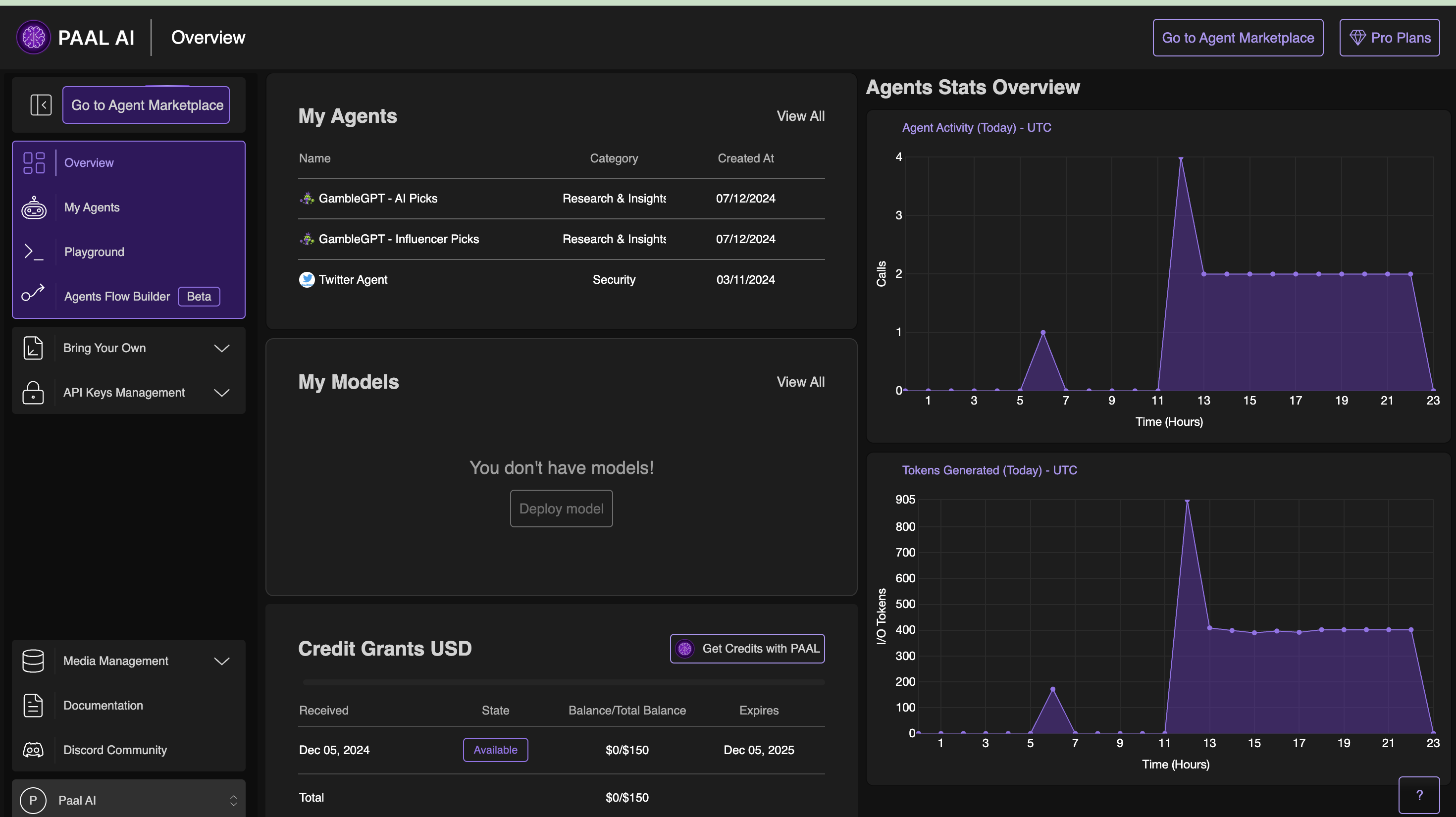
The **Overview Page** serves as the central hub for monitoring activity, managing agents, resources, and media, and accessing critical insights like usage and performance.
#### **Features**
* **Plan Usage**:
* Tracks available credit balance and consumption percentage.
* Click **"View Usage"** for detailed insights into credit consumption.
* **Agent Stats Overview**:
* **Agent Activity**: Visualizes calls/tasks performed in the last 24 hours.
* **Tokens Generated**: Displays the number of input/output tokens processed over time.
* **Media Storage**:
* Categorizes stored media by type (e.g., Documents, Images, Videos, YouTube links, Audio).
* Enables file viewing and management directly from the dashboard.
* **My Agents**:
* Lists active agents with details like name, category, and creation date.
* Allows managing, editing, and deploying agents.
* **My Models**:
* Displays deployed AI models and provides a **"Deploy Model"** option for adding new ones.
* **Credit Grants USD**
* **Tracks Allocated and Available Credits**:
* Displays the total allocated credits, the remaining balance, and their expiration dates.
* **Purchase Additional Credits**:
* Click **"Get Credits with PAAL"** to buy more credits.
***
### **2. My Agents and Agent Marketplace**
#### **My Agents**
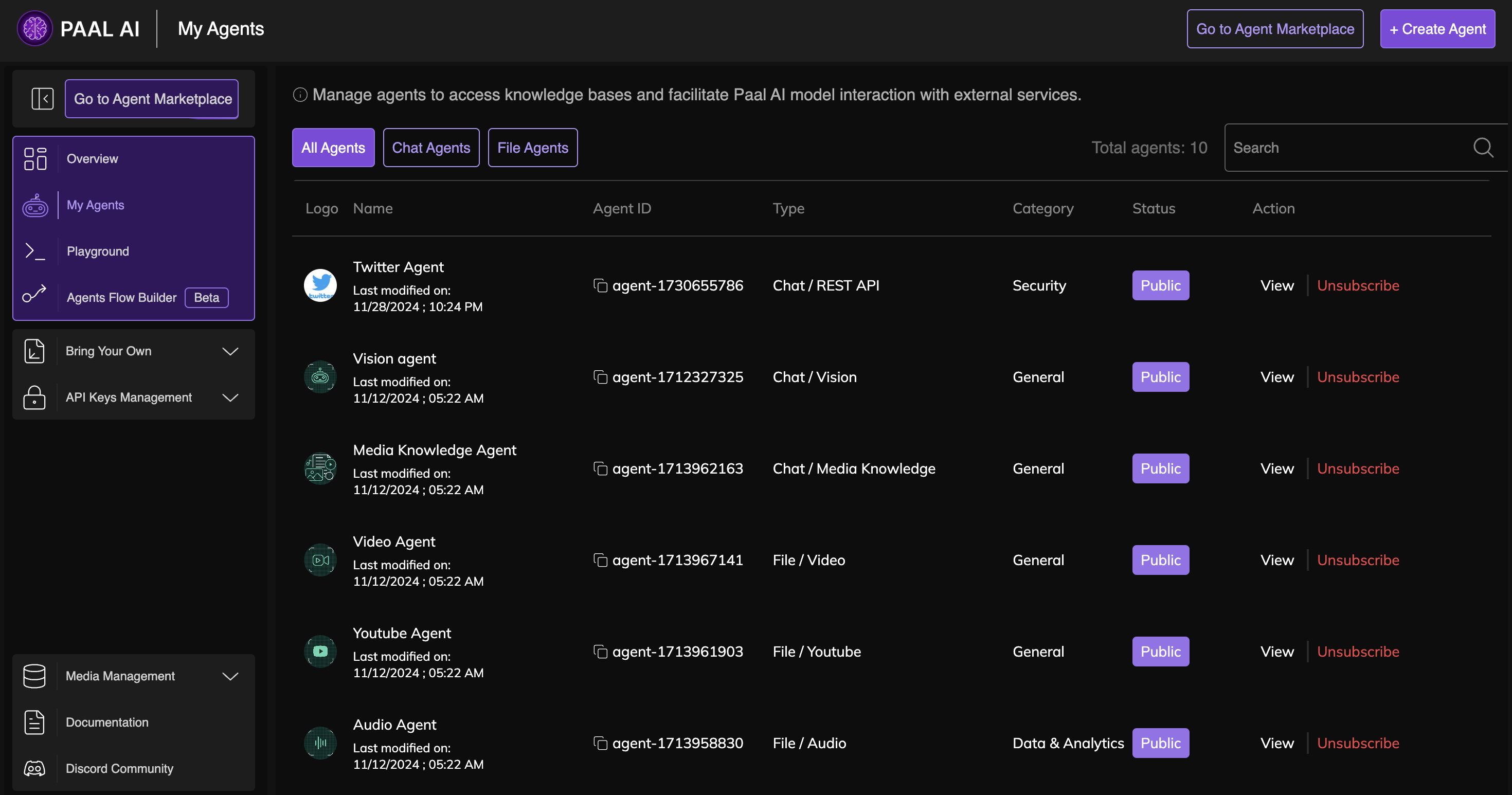
* **Key Features**:
* Categorizes agents as **Chat Agents** or **File Agents**.
* Provides quick actions:
* **Edit**: Modify agent settings.
* **Unpublish**: Change an agent’s availability.
* **Delete**: Permanently remove agents.
* **Agent Details**:
* Displays agent type, category, and status (e.g., Public, Pending).
* Allows filtering and searching for specific agents.
* **Agent Management**:
* **Create Agent**: Add new agents with custom configurations.
* **View All**: Access a complete list of agents with timestamps for tracking changes.
#### **Agent Marketplace**
* **Categories**:
* Includes agents for Marketing, Web3, IoT, Data Analytics, and more.
* **Agent Details**:
* Displays community ratings, category, and creator information.
* Provides quick deployment options using the **Add** button.
* **Actions**:
* **Search**: Find agents by name or type.
* **Copy ID**: Use for integrations and workflows.
***
### **3. Playground**
#### **Purpose**
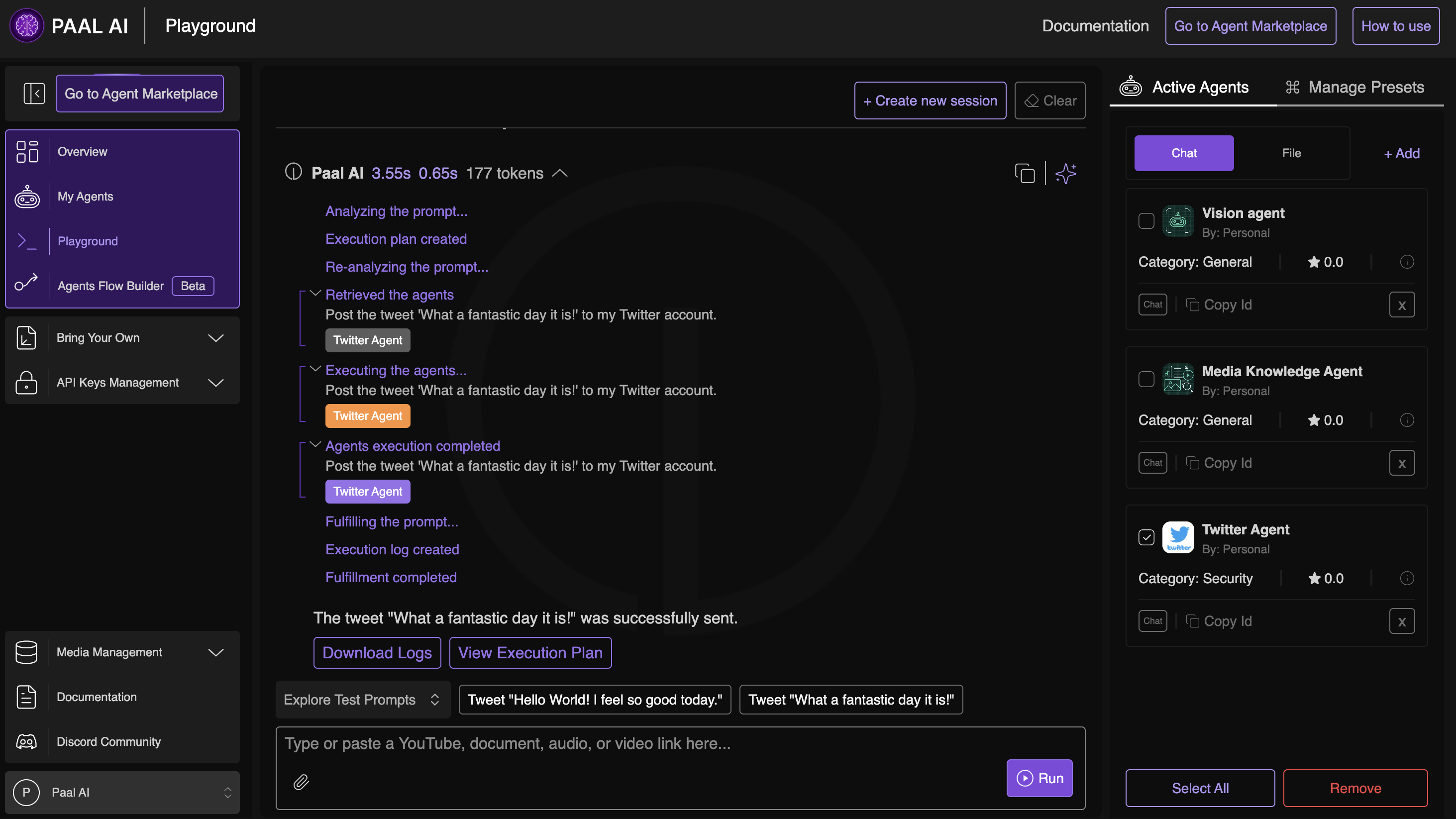
A sandbox environment to test agents, workflows, and custom prompts in real-time.
#### **Key Features**
* **Multi-Agent Interaction**:
* Activate multiple agents simultaneously for collaborative tasks.
* **Preset Management**:
* Save commonly used setups for faster execution.
* **Execution Logs**:
* Monitor step-by-step execution plans and logs.
* **Output Options**:
* Download logs or view execution breakdowns.
#### **Steps to Use**
1. **Add Agents**:
* Choose agents from **Chat**, **File**, or **Default** categories.
2. **Input Prompts**:
* Enter text, document links, or audio/video URLs for processing.
3. **Run and Analyze**:
* Review execution logs and plans.
* Refine workflows using presets or modify agents.
***
### **4. Agents Flow Builder**
#### **Purpose**
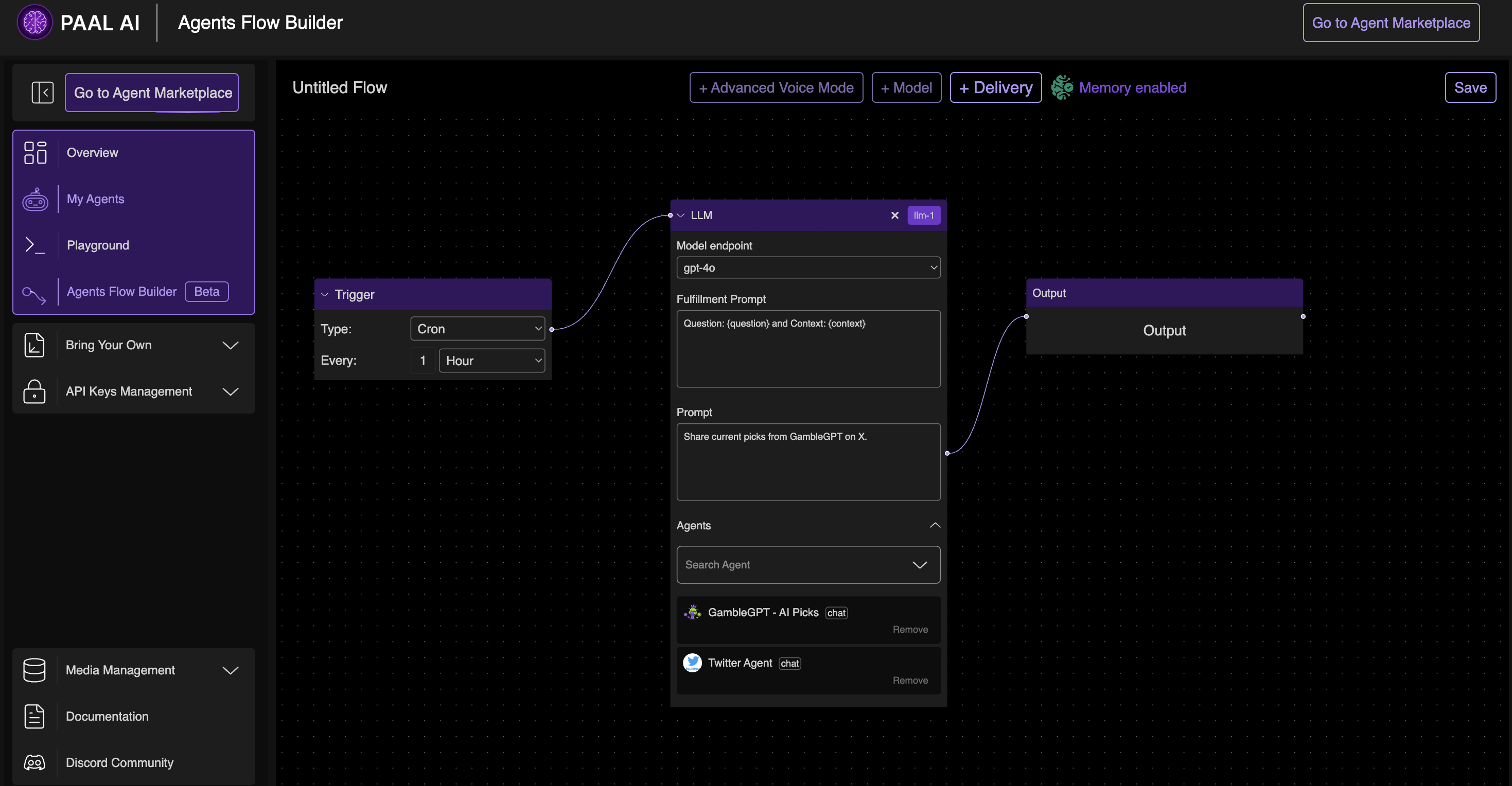
An intuitive drag-and-drop tool to automate workflows using triggers, LLMs, and delivery nodes.
#### **Key Features**
* **Triggers**:
* Initiate workflows based on events like **Cron Schedules**.
* **LLM Nodes**:
* Integrate language models like GPT-4 Turbo with custom prompts.
* **Delivery**:
* Send results through Slack, Webhooks, Emails, or Phones.
* **Advanced Options**:
* Enable memory for context retention.
* Map outputs to specific delivery nodes.
#### **Steps to Build Workflows**
1. **Add Nodes**:
* Drag Trigger, LLM, and Delivery nodes to the canvas.
2. **Configure Nodes**:
* Set prompt instructions, assign agents, and choose delivery methods.
3. **Save and Test**:
* Link nodes, save the workflow, and test execution.
#### **Example Workflow: Automated Twitter Bot**
**Purpose**: Automate tweets combining data from Binance price feeds, GambleGPT picks, news, and weather updates.
**Workflow**:
1. **Trigger Node**: Set to run every 30 minutes.
2. **Data Sources**:
* **Binance Agent**: Fetch BTC and ETH prices.
* **GambleGPT**: Get sports betting picks.
* **News Agent**: Pull trending headlines.
* **Weather Agent**: Retrieve weather updates.
3. **LLM Node**: Combine inputs into an engaging tweet using GPT-4 Turbo.
4. **Delivery Node**: Post formatted output to Twitter.
**Example Tweet**:\
"📈 BTC: $45,000, ETH: $3,200 🔥 Lakers vs. Heat: +7 📰 Tech breakthrough 🚀 Weather: Sunny, 25°C #Crypto #Sports #News"
***
### **5. Bring Your Own Model (BYOM)**
#### **Deploying a Model**
* Search Hugging Face models by tags or keywords.
* Configure parameters like context length and repository tokens.
* Click **Deploy** to integrate the model.
#### **Deploying an Endpoint**
* Assign deployed models to scalable endpoints.
* Configure instance types (Inference 1x, 2x, or 3x) and scaling options.
* Deploy endpoints with automatic cost-saving features like **Scale-to-Zero**.
***
### **6. API Key Management**
#### **API Keys**
* **Features**:
* Create and manage secure API keys.
* Monitor usage and delete unused keys.
* **Best Practices**:
* Keep keys confidential and rotate them regularly.
#### **IoT (MQTT) Credentials**
* **Features**:
* Generate and manage credentials for IoT devices.
* **Best Practices**:
* Use unique credentials per device and delete unused ones.
***
### **7. Media Management**
#### **Storage**
* **Purpose**:
* Manage uploaded files for agents to process.
* **Features**:
* Sort files by date, size, or type.
* Assign files to agents.
#### **Usage**
* **Purpose**:
* Track storage activity and costs.
* **Features**:
* Monitor API requests and file processing.
* View cost breakdowns for efficient management.
***
### **8. Documentation**
#### **Contents**
* **Agent Types**:
* Explains Knowledge Agents, IoT Agents, and REST API Agents.
* **Integration Guides**:
* Step-by-step instructions for deploying and customizing agents.
***
### **FAQs**
#### **1. What are Paal AI Agents?**
Agents extend AI model functionality by enabling data processing, automation, and contextual interactions.
#### **2. How can I integrate an agent?**
Use the **Agent ID** for API-based integrations or deploy agents directly via the marketplace.
#### **3. What is BYOM?**
Bring Your Own Model lets you deploy custom AI models and endpoints for specialized tasks.
#### **4. How do I monitor costs?**
Check the **Usage** section in Media Management for detailed cost breakdowns.
***